[Research] Unlocking BitLocker: Finding Vulnerabilities Without Breaking Encryption - Part 2 (EN)
Part 1: https://hackyboiz.github.io/2026/01/22/banda/BitLocker_part1/ko/
0. Overview
Hello! This is banda from the Dongsangimong team. It has been a little while, but do you remember my BitLocker research post? After taking a break from it for some serious cultivation, I decided to dig into BitLocker again.
In Part 1, we looked at the properties of XTS-AES used by BitLocker and CrashXTS, a mechanism that causes system operations to fail by taking advantage of the lack of ciphertext integrity. In CrashXTS, an attacker cannot write chosen plaintext to an encrypted disk. Instead, they can modify a particular ciphertext block and corrupt its corresponding plaintext block unpredictably.
Directly breaking AES-encrypted data is extremely difficult, so this time let us focus not on the cryptographic algorithm but on how keys are unlocked and used. In this long-awaited return, we will look at interesting vulnerabilities arising from the trust relationship between WinRE and Boot Manager.
1. Why did WinRE become part of BitLocker’s attack surface?
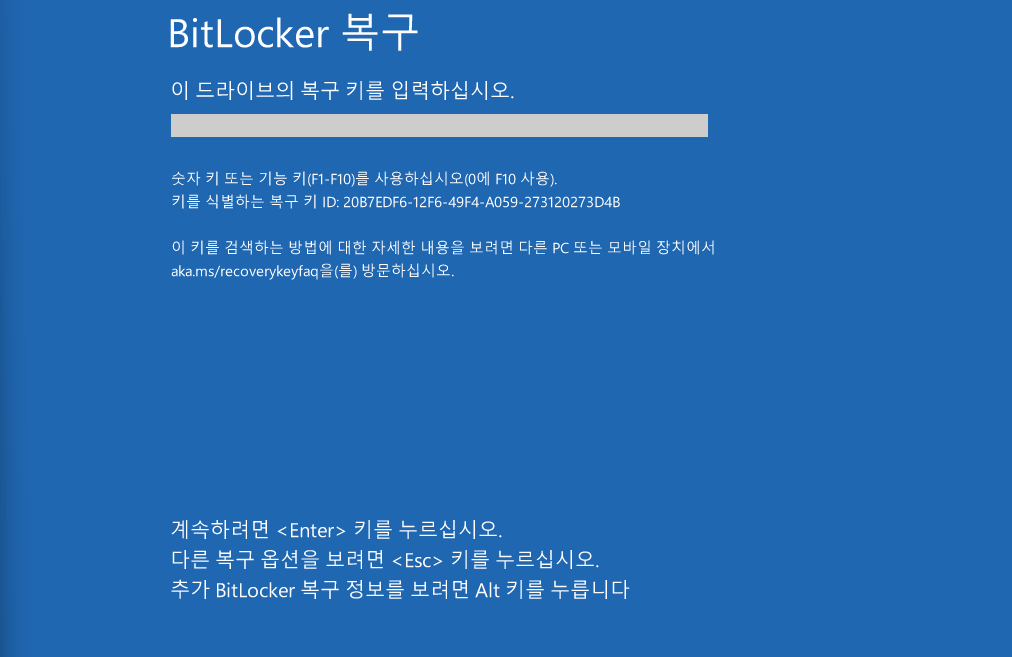
If you have used BitLocker before, this screen will probably be familiar. As a quick recap, BitLocker encrypts selected drives and allows Windows to read the disk after boot-time conditions such as TPM, PIN, or a recovery key are satisfied. Sector data is encrypted with the FVEK, while the VMK that protects the FVEK is accessed through protectors such as TPM, TPM+PIN, or a recovery password.
We could approach this from the perspective of the encryption algorithm, but breaking modern AES in BitLocker would overturn the assumptions behind modern symmetric cryptography. If you manage that, do not report a BitLocker bug — go write cryptographic history.
From a vulnerability-research perspective, the interesting boundary is therefore where a legitimately unlocked key is propagated and when it is taken back.
As we will see in more detail, the boot and recovery process cannot be explained solely by Boot Manager or an EFI load. It performs many actions: selecting a boot target, branching into recovery, permitting access to the OS volume, and applying security decisions and policies.
When hunting bugs in a normal OS, we commonly track privileges from the logged-in user and running processes. In WinRE and the earliest boot stages, however, an ordinary user session has not even started. Rather than asking “who executed this?”, boot-time research should focus on questions like these:
- Under what conditions did the TPM provide the BitLocker key?
- Which boot or recovery code was selected for execution?
- Which settings, logs, and parameters does that code trust and process?
- How far is access to the unlocked OS volume propagated?
- When recovery ends or an interactive tool is started, does relocking actually occur?
The issues discussed here are close to Security Feature Bypass bugs: access is permitted legitimately, but escapes its intended scope.
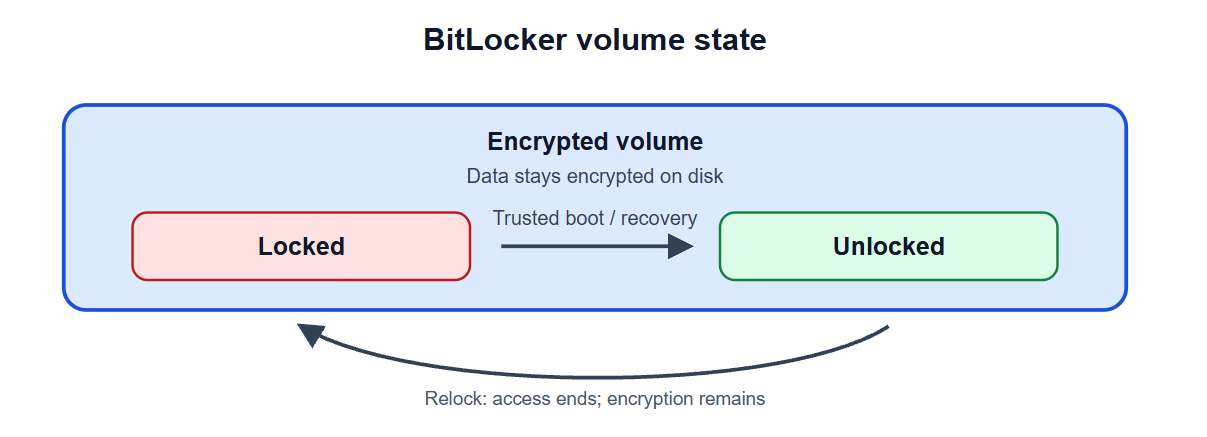
How can we determine how far OS-volume access actually reaches? First, we need to distinguish BitLocker’s encryption state from its access state. Locked/Unlocked and Encrypted/Decrypted do not mean the same thing.
- Encrypted: Disk data is stored as ciphertext. This describes the form in which data is stored on disk.
- Locked: The disk remains encrypted, but the current environment cannot use its decryption key and therefore cannot access its files. This describes whether the current environment can use the key to read the data.
An encrypted OS volume can thus be Unlocked during a normal boot or a trusted recovery operation. Conversely, relock does not encrypt the disk again; it prevents the current environment from using the BitLocker key and blocks OS-volume access again. Therefore, seeing Protection On and Lock Status: Unlocked together is not unusual.
2. WinRE is a separate trust boundary
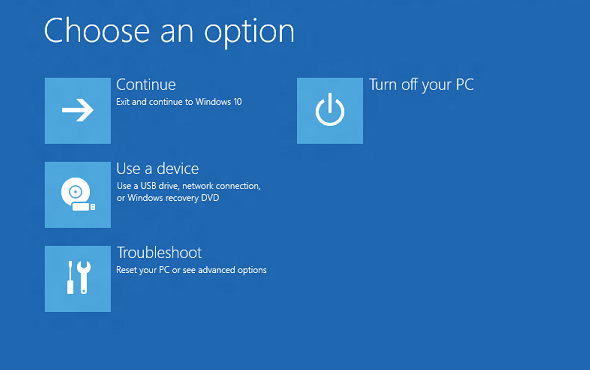
WinRE (Windows Recovery Environment) is a pre-OS environment that can perform Startup Repair, system reset, update removal, Command Prompt, and Defender Offline scanning. It is not always running: it boots from a separate recovery image. Crucially, it must still start when Windows has a problem or when the BitLocker OS volume cannot be read immediately, so WinRE is designed as a Recovery OS separate from the OS volume.
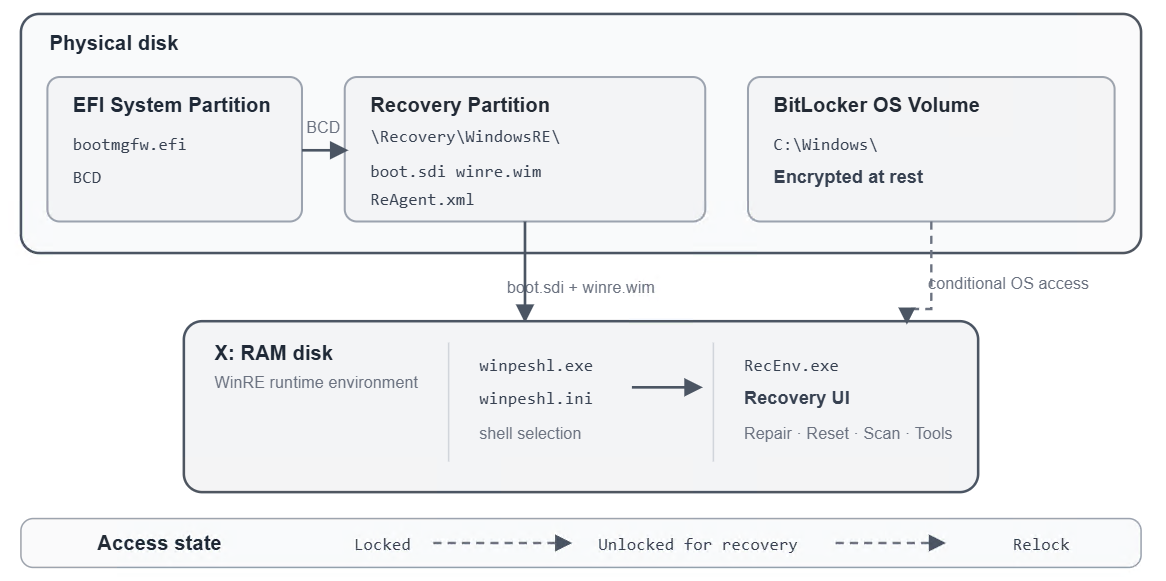
The Recovery OS executables, DLLs, drivers, and recovery tools are commonly contained in a compressed image named winre.wim. On a typical UEFI system, bootmgfw.efi on the EFI System Partition runs as Windows Boot Manager, reads the BCD in the same area, and decides whether to boot normal Windows or take a recovery path.
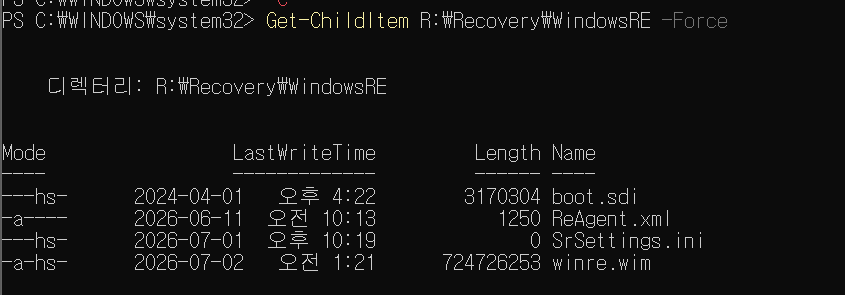
When the BCD selects a WinRE RAM-disk boot, boot.sdi and winre.wim from the recovery partition are used.
boot.sdi: An SDI image that builds the basic structure of a virtual NTFS disk in memory.winre.wim: The compressed image expanded onto that RAM disk to build the actual Recovery OS, such as theR:drive shown in the screenshots.
In other words, bootmgfw.efi and the BCD decide the entry path — which of normal Windows or WinRE, and which image, to use. The subsequently loaded boot.sdi and winre.wim provide the actual disk structure and operating tools in the selected WinRE environment.
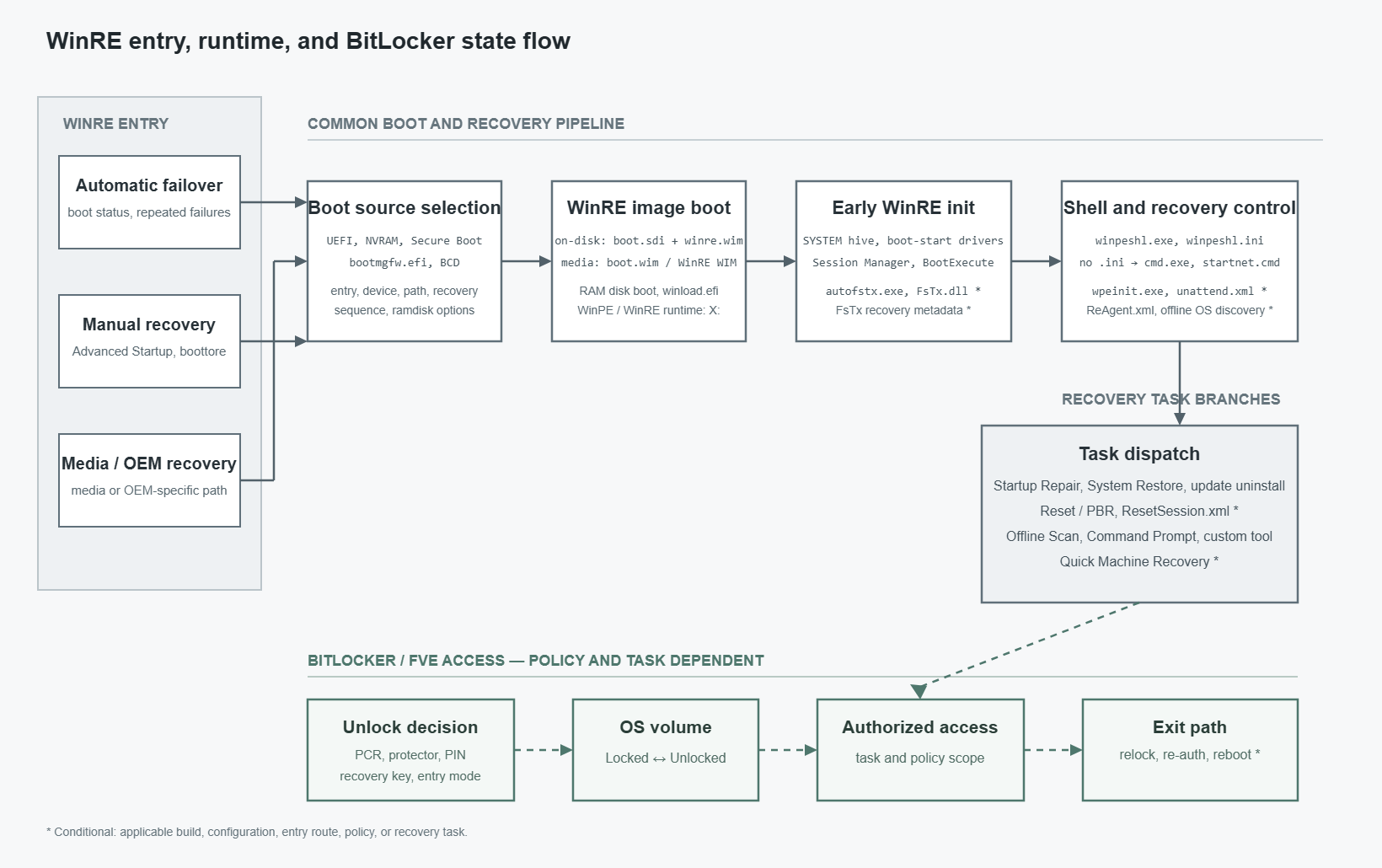
Input processing continues even after WinRE starts from R:. The SYSTEM hive and Boot Execute determine initial execution; winpeshl.ini, startnet.cmd, and wpeinit.exe construct the WinPE shell. Then ReAgent.xml, offline-OS information, recovery logs, and task-specific settings decide which OS is targeted and which recovery task and process run.
When analyzing WinRE, it is useful to follow each stage: which entry started the image, which volumes and drivers initialization prepared, and which settings the shell and recovery task use to launch the next process and change the FVE state.
Before the case study, let us look at two classes of logic flaws previously observed in WinRE boot and recovery flows.
3.1 Boot / Recovery Object Binding Failure
Trusted WIM and Target-Volume Binding Failures
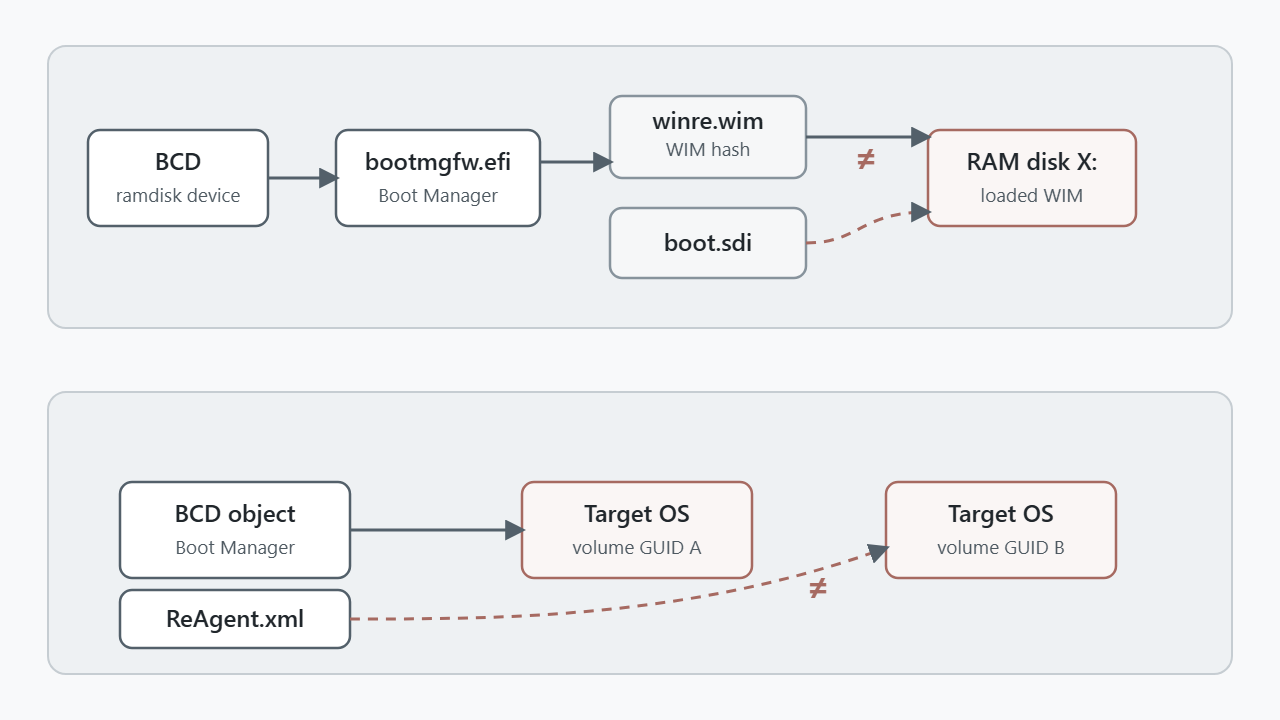
During a WinRE boot, Boot Manager follows the RAM-disk device and path supplied by the BCD to find boot.sdi and winre.wim. A Trusted WIM Boot verifies the selected WIM’s integrity and permits BitLocker OS-volume access on the assumption that WinRE will start from that image.
After the BCD determines the recovery path, Boot Manager lays boot.sdi and winre.wim out in one RAM-disk buffer as follows:
RamDiskImageBuffer = AllocateMemory(SdiSize + WimSize);

LoadFileToBuffer(SdiPath, RamDiskImageBuffer, SdiSize, NULL);

LoadFileToBuffer(
    WimPath,
    Add2Ptr(RamDiskImageBuffer, SdiSize),
    WimSize,
    WimHash);

WimAddress = RamDiskImageBuffer + SdiTrust->WimOffset;
In this flow, WIM A is read at RamDiskImageBuffer + SdiSize and the WimHash is computed for precisely that WIM A. The actual WinRE start address, however, is determined by SdiTrust->WimOffset. Normally, SdiTrust->WimOffset should equal SdiSize, the real start offset of WIM A.
What if that relationship is not checked? WimHash could verify WIM A while SdiTrust->WimOffset points to another WIM B in the buffer. That would make the verified recovery image differ from the recovery image that actually constructs WinRE.
There is a similar example: the target-volume-confusion vulnerability in Online PBR. It occurs after WinRE boots, when Online PBR finds its target OS. PBR uses the BCD’s osdevice to find the target volume and parses ResetSession.xml there. If it misidentifies the Recovery partition as the target OS, it can use that partition’s configuration for a PBR operation.
<WindowsRE version="2.0">
  <WinreBCD id="{WinRE-BCD-GUID}" />
  <WinreLocation
      path="\\Recovery\\WindowsRE"
      id="0"
      offset="..."
      guid="{RECOVERY-PARTITION-GUID}" />
  <ImageLocation path="" id="0" offset="0" guid="{...}" />
  <PBRImageLocation path="" id="0" offset="0" guid="{...}" index="0" />
</WindowsRE><Operation OperationType="DecryptVolumes" TargetVolume="C:\" />The core issue was that the configuration read from the Recovery partition was not verified as belonging to the real target OS. If its DecryptVolumes entry named a BitLocker-protected OS volume, PBR could process it as a normal recovery operation without restriction. In effect, it could remove protection from the OS volume by using PBR’s decryption authority even without the user entering a recovery key or disabling BitLocker protection.
Both patterns point to the same research question: throughout a boot transition, do the verified WIM, the selected WIM, and the OS volume being opened continue to refer to the same object?
3.2 Recovery Access Scope Bypass
Recovery Access Scope Bypass
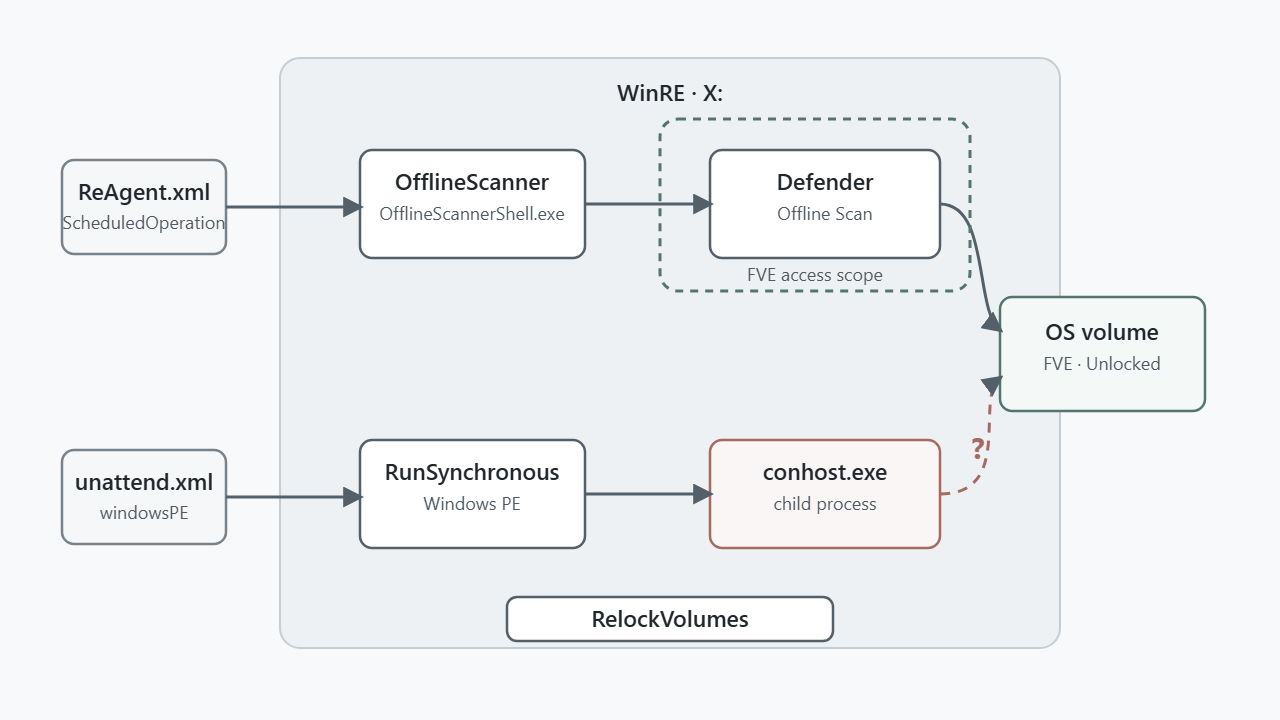
Some boot-time operations, such as Offline Scan, need to read the OS volume. Because Offline Scan must inspect that volume, WinRE runs it with the BitLocker volume auto-unlocked.
For example, a published case described a vulnerable path in which a trusted scanning tool could launch an unintended child process through an Offline Scan setting in ReAgent.xml. The problem was not necessarily the scanner itself; it was the lack of validation that the same access level should extend to the next process created by that tool.
Normally, opening a dangerous tool such as cmd.exe should first relock the OS volume so it cannot be read without a recovery key. In the vulnerable path, however, the Offline Scanner-permitted tttracer.exe could receive cmd.exe as an argument. Since relock had not occurred, cmd.exe could inherit exposure to an OS volume that was already open.
For boot-time research, it is therefore important to trace which configuration a scheduled tool reads, whether it can create child processes, and whether relock runs before the operation ends.
The implementations of these two WinRE issue types differ, but they ask the same question:
Does the access scope selected or permitted at every stage by its trust conditions remain within its intended bounds through the next stage’s configuration parsing, process execution, and relock?
The object may be a recovery image, a target OS volume, or a process to execute. The access scope is the unlocked state of the BitLocker OS volume and the point at which it is re-locked.
Let us apply that question to the following practical flow.
4. CVE-2026-45585
Now we will trace the WinRE recovery-input and access-scope issues above as one execution chain. This case study targets the publicly disclosed FsTx recovery path in CVE-2026-45585.
4.1 Core structure and research question
Starting from the WinRE components autofstx.exe and Fstx.dll, the question is whether an FsTx artifact processed as recovery data during WinRE initialization can affect the BitLocker OS-volume access boundary. The controlled input in this study is an FsTx record on a USB volume.
USB: System Volume Information\FsTx
→ WinRE BootExecute: autofstx.exe
→ FsTx.dll: in-doubt transaction rollback
→ delete X:\Windows\System32\winpeshl.ini
→ winpeshl.exe: cmd.exe /K startnet.cmd fallback
→ OS-volume access before RecEnv.exe / RelockVolumes()
As a preview: while an FsTx record is processed for rollback, a LinkPath pointing to X:\Windows\System32\winpeshl.ini causes the rollback result to prevent the current WinRE instance from finding RecEnv.exe. It launches the cmd.exe /K startnet.cmd fallback instead. Let us see why this Security Feature Bypass occurs.
4.2 Test conditions and baseline state
Windows 11 Pro 24H2 VM
TPM enabled/ready, Secure Boot enabled
WinRE enabled
BitLocker OS volume C: enabled
The reproduction environment was a Windows 11 Pro 24H2 VM with TPM and Secure Boot enabled, as well as WinRE and the BitLocker OS volume enabled. TPM and a Recovery Password were used together as key protectors.
PS C:\> manage-bde -status C:
Volume C: [OS Volume]
    Size:                 63.00 GB
    BitLocker Version:    2.0
    Conversion Status:    Fully Encrypted
    Percentage Encrypted: 100.0%
    Encryption Method:    XTS-AES 128
    Protection Status:    Protection On
    Lock Status:          Unlocked
    Key Protectors:
        TPM
        Numerical Password

PS C:\> manage-bde -protectors -get C:

Volume C: [OS Volume]
    TPM:
      ID: {<TPM-PROTECTOR-GUID>}
      PCR Validation Profile:
        7, 11

    Numerical Password:
      ID: {<RECOVERY-PROTECTOR-GUID>}

PS C:\> reagentc /info

Windows Recovery Environment (Windows RE)
and system reset configuration

    Windows RE status:    Enabled
    Windows RE location:  \\?\GLOBALROOT\device\
                           harddisk0\partition<RECOVERY>\Recovery\WindowsRE
    BCD identifier:       {<WINRE-BCD-GUID>}
One possible source of confusion is that “Lock Status: Unlocked” while booted normally simply means that Windows is using its own volume. It does not mean BitLocker protection is disabled.
For the reproduction check, I created a marker file on the OS volume:
mkdir C:\yk_lab
echo YK_MARKER > C:\yk_lab\marker.txt
I also confirmed that the HKLM\SOFTWARE\Microsoft\RecoveryEnvironment\FailRelock value was absent.
According to Microsoft documentation, a TPM-only environment satisfying the PCR[7] supported-device condition can auto-unlock a BitLocker OS volume when started from trusted WinRE. Which execution paths can access that auto-unlocked volume before RecEnv.exe relocks it?
4.3 Normal flow and the relock path bypassed by FsTx
Once trusted WinRE begins initialization, the normal flow has winpeshl.exe read winpeshl.ini and launch RecEnv.exe. RecEnv.exe calls RelockVolume() before displaying the recovery UI.
CImmersiveRecoveryUi::Run
  └─ CRecoveryEnvironment::RelockVolumes
      └─ CFveUtil::RelockAllVolumes
          └─ CFveUtil::RelockVolume
CImmersiveRecoveryUi::Run is both the recovery-UI entry point and the relock trigger. Before drawing its UI, it calls CRecoveryEnvironment::RelockVolumes; if that fails, it logs “Failed to relock volumes. 0x%08x Shutting down.” and exits.
// CImmersiveRecoveryUi::Run, summarized
if (!relockHandled) {
    HRESULT hr = CRecoveryEnvironment::RelockVolumes(*this);
    if (FAILED(hr)) {
        WdsSetupLogMessageW(..., "Failed to relock volumes. 0x%08x  Shutting down.", hr);
        goto shutdown;
    }
    CRecoveryEnvironment::UnlockVolumes(*this, 0);
    relockHandled = 1;
}
The internal RelockVolumes dispatcher, CFveUtil::RelockAllVolumes, iterates volumes with FindFirstVolumeW/FindNextVolumeW and calls CFveUtil::RelockVolume for each volume.
// CFveUtil::RelockAllVolumes, summarized
while (FindNextVolume(...)) {
    if (Utils::GetDriveLetterForVolumeMountPoint(szVolumeName, letter, MAX_PATH))
        continue;
    if (!CFveUtil::RelockVolume(this, letter))
        break;
}
return 31; // relock failed
The normal path is:
winpeshl.exe → winpeshl.ini → RecEnv.exe → RelockVolumes() → recovery UIThis case study does not tamper with or make RelockVolume() fail. Instead, if winpeshl.ini disappears and winpeshl.exe selects a fallback shell rather than RecEnv.exe, the relock path is never reached.
4.4 FsTx artifacts and the root cause
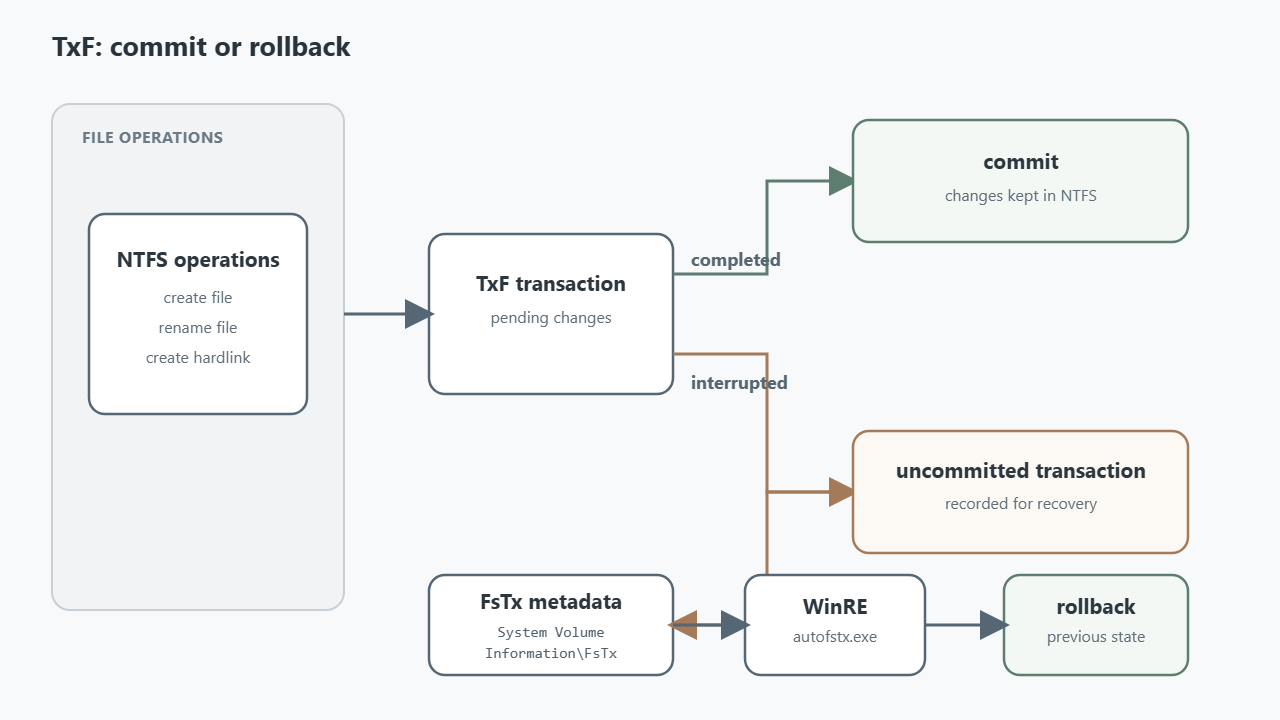
FsTx is related to TxF (Transactional NTFS), an NTFS feature that groups file operations into one transaction. For example, creating a file, renaming it, and adding a hard link elsewhere can be started as a group. Once all work is finished, the transaction is committed and the changes remain. If power is lost or an error occurs midway, uncommitted work is rolled back to its prior state.
FsTx metadata is the record needed for that rollback. It logs file operations that began and paths that were to be created or removed under System Volume Information\FsTx on a volume. WinRE’s autofstx.exe and FsTx.dll read those records and process the recorded operations to restore the file system to its pre-transaction state.
For this test, I placed only an FsTx artifact on USB — not an executable.
FsTx\
└─ 95F62703B343F111A92A005056975458\
   ├─ FsTxLogs\
   │  ├─ FsTxKtmLog.blf
   │  ├─ FsTxKtmLogContainer00000000000000000001
   │  ├─ FsTxKtmLogContainer00000000000000000002
   │  ├─ FsTxLog.blf
   │  ├─ FsTxLogContainer00000000000000000001
   │  └─ FsTxLogContainer00000000000000000002
   └─ FsTxTemp\
       └─ 98F62703B343F111A92A005056975458
The root cause has two connected steps: autofstx.exe accepts an external volume as an FsTx recovery candidate, then FsTx.dll processes an absolute path in a rollback record.
The reason to place only an FsTx artifact on the USB was to determine whether WinRE finds it as a normal recovery log and rolls back the file operation left in the transaction record. If that record’s LinkPath points to X:\Windows\System32\winpeshl.ini, the rollback deletes that file.
TargetPath (source data) = \??\C:\Windows\win.ini
LinkPath (new link)      = \??\X:\Windows\System32\winpeshl.ini
This represents creating a hard link named winpeshl.ini from win.ini. Critically, to trigger the issue, the creation operation must be left uncommitted, with only the log remaining.
When WinRE finds a stored but unfinished transaction, it rolls it back for file-system consistency. Reverting hard-link creation means deleting the new link:
File = DoCreateFile(..., LinkPath /* = X:\...\winpeshl.ini */, ...);
dispositionFlags = 0x11;   // DELETE | POSIX
SetFileInformationByHandle(File);   // → deletes LinkPath directly
The rollback code therefore means “delete the file at LinkPath.” There is no apparent verification that the link was truly created by this transaction. winpeshl.ini originally comes from winre.wim and is unrelated to the transaction, yet the rollback treats the file at LinkPath as its deletion target.
How autofstx.exe replays FsTx transactions
For autofstx.exe 26100.1, the OS version used in this reproduction, the PDB reveals this flow:
main
  → AutoFsTxSession::Init
      → LdrLoadDll("FsTx.dll")
  → AutoFsTxSession::RunSession
      → VolumeContext::FindFsTxVolumes
      → FsTxSessionSet::ScanSessions
      → FsTxCreateRecoverySession
      → FsTxEnumTransactions
      → FsTxPerformRecovery
autofstx.exe does not roll back FsTx logs itself. It first finds volumes containing System Volume Information\FsTx and passes them as recovery targets; the dynamically loaded FsTx.dll performs the log parsing and rollback.
The relevant points are therefore autofstx.exe’s volume selection and FsTx.dll’s LinkPath handling. The former passes the USB FsTx artifact to WinRE recovery code, while the latter deletes X:\Windows\System32\winpeshl.ini specified in the record.
VolumeContext::FindFsTxVolumes enumerates the volume-GUID namespace with FindFirstVolumeW/FindNextVolumeW, finds a mount path that is a drive-letter root (A:\${b} throughZ:${b}), and adds a volume to the recovery candidates if it contains a System Volume Information\FsTx directory.
// VolumeContext::FindFsTxVolumes, summarized
GetVolumePathNamesForVolumeNameW(volumeGuid, mountPaths, ...);

for (WCHAR *i = mountPaths; *i; i += wcslen(i) + 1) {
    if (wcslen(i) == 3 && i[1] == L':' && i[2] == L'\\') {
        driveLetter = *i;
        break;
    }
}
if (!driveLetter) continue;

wcscat_s(path, MAX_PATH, L"System Volume Information\\FsTx");
DWORD attrs = GetFileAttributesW(path);
if (attrs == INVALID_FILE_ATTRIBUTES || !(attrs & FILE_ATTRIBUTE_DIRECTORY))
    continue;

candidates.push_back(volume);
Thus, the function selects recovery targets based on the presence of a drive letter and a System Volume Information\FsTx directory. An external USB with that structure is accepted as a recovery candidate, then AutoFsTxSession::RunSession finds its session and starts replay with FsTxPerformRecovery(handle, 0, 60000).
// Recovery handling for each candidate inside AutoFsTxSession::RunSession
messageContext = (AutoFsTxSession *)((char *)session + 96);
if (recoveryStatus >= 0) {
    FsTxMessageContext::OutputMessage(messageContext, 2u, 0x3F4u, sessionIndex);
    v50 = 1;
} else {
    FsTxMessageContext::OutputMessage(messageContext, 8u, 0x3F5u, sessionIndex, recoveryStatus);
    v50 = 0;
}
*(_BYTE *)(fsTxSession + 98) = v50;
FsTxSession::CloseSession((FsTxSession *)fsTxSession, closeReason);

// Actual replay call (export of dynamically loaded FsTx.dll)
pfnFsTxPerformRecovery = (int64 (*)(int64, QWORD, int64))g_FsTxPerformRecovery;
FsTxVolumes = pfnFsTxPerformRecovery(sessionHandle, 0, 60000);
autofstx.exe does not process the work performed by FsTx.dll directly; it only receives the success or failure result and logs it. Deletion of winpeshl.ini happens in FsTx.dll’s replay stage.
Now let us look at the code where the USB volume becomes a recovery candidate and where rollback processes LinkPath.
Root-cause code
1. VolumeContext::FindFsTxVolumes — accepting an untrusted USB as a recovery candidate
BaseAddress = FindFirstVolumeW(Str);
// ← Enumerates every volume; no fixed/removable/USB distinction

// Is there a drive-letter root such as X:\?
if ( v20 == 3 && i[1] == 58 /* ':' */ && i[2] == 92 /* '\' */ && (letter a-z/A-Z) )
    v17 = *i;                              // Obtain the drive letter

// Sole eligibility check: does "<drive>:\System Volume Information\FsTx" exist?
wcscat_s(Str, 0x104u, L"System Volume Information\\FsTx");
FileAttributesW = GetFileAttributesW(Str);
if ( FileAttributesW == -1 || (FileAttributesW & 0x10) == 0 )
    v7 = 0;                                // Reject if the directory is absent
LABEL_54:
    v23 = AutoChkMalloc(0x48u);            // ★ This is where the volume becomes a recovery candidate
    ...
    v24[66] = v7;                          // v7(+0x42): whether recovery runs; RunSession uses it
As introduced earlier, a volume with a drive letter and a System Volume Information\FsTx directory is handled as a recovery candidate.
2. PerformOperationRollbackRecovery (op == 5) — cross-volume deletion of winpeshl.ini
if ( opType == 5 )   // Roll back HARDLINK creation.
{
    TempRootPath = (wchar_t *)GetTempRootPath(recoveryCtx, linkPath, linkPath);
    v30 = TempRootPath;
    if ( TempRootPath )
    {
        v43 = AddPathToPathSet((PRTL_DYNAMIC_HASH_TABLE)(recoveryCtx + 2152), TempRootPath);
        RtlNtStatusToDosError(v43);
    }
    HIDWORD(v115) = 0;

    File = (HANDLE)DoCreateFile(recoveryCtx, 0, (_DWORD)Name, (unsigned int)&v135, *(_DWORD *)(opRecord + 12) & 8);
    // ↑ Opens Name, record path[1] = \??\X:\Windows\System32\winpeshl.ini,
    //   directly as an absolute NT path. There is no check that its volume
    //   matches the source volume of this transaction.

    if ( File != (HANDLE)-1LL || (LastWin32Error = RtlGetLastWin32Error()) != 0 )
    {
        v44 = LastWin32Error;
        if ( LastWin32Error == 2 ) // No link: skip
        {
            LastWin32Error = 0;
            goto LABEL_225;
        }
        if ( !LastWin32Error )
        {
            dispositionFlags = 17;
            // 0x11 = DELETE | POSIX — unvalidated cross-volume deletion
            SetFileInformationByHandle(File);
            goto LABEL_225;
        }
    }
}
The problem is that DoCreateFile() opens the record’s Name directly as an absolute NT path and does not confirm that the file was the link created by this transaction. If a USB transaction record sets LinkPath to X:\Windows\System32\winpeshl.ini, FsTx.dll treats the existing file — unrelated to the USB source volume — as a link that must be reverted. With dispositionFlags = 0x11, that path is removed with a POSIX delete.
4.5 Reproduction result
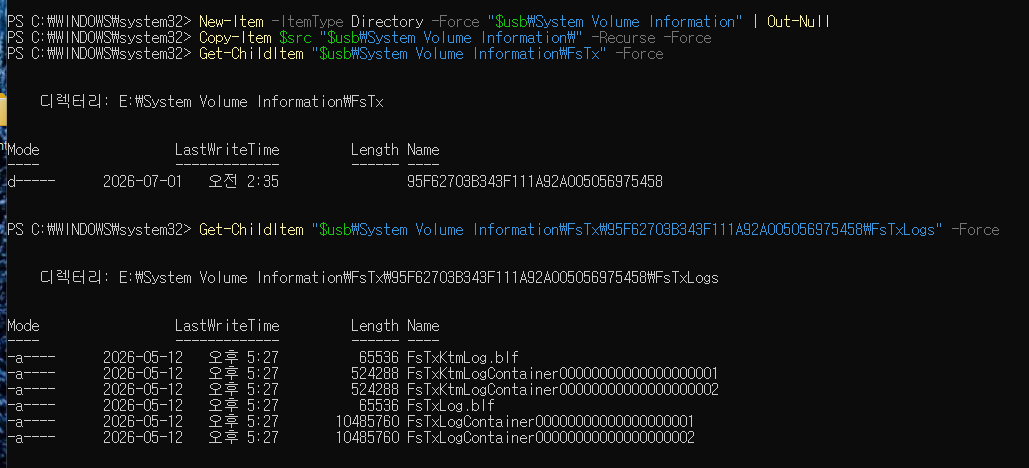
First, I placed the FsTx artifact on USB drive E:. A normal boot into WinRE would display the recovery UI. Let us look at the result after inserting the USB and booting into WinRE.
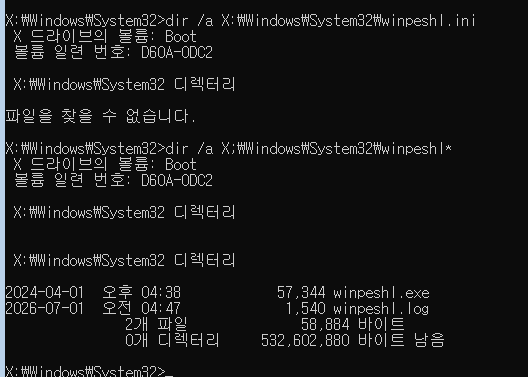
After connecting the USB containing the intended FsTx artifact and booting into WinRE, X:\Windows\System32\cmd.exe appears instead of the normal recovery UI. Files such as winpeshl.exe and winpeshl.log remain, but winpeshl.ini — which should be in the same directory — cannot be found. This indicates it was deleted by rollback.
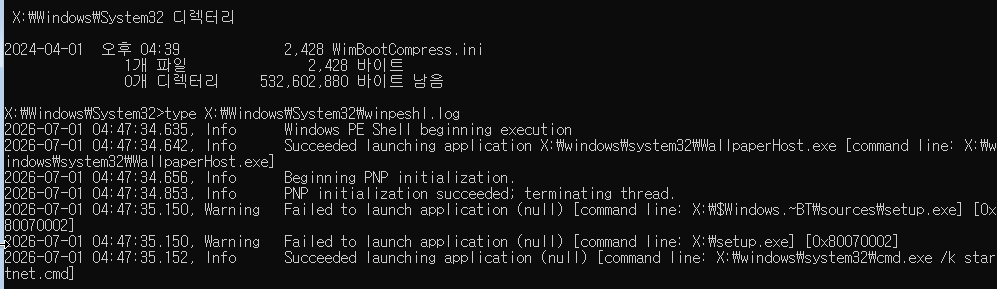
winpeshl.log also records execution of X:\Windows\System32\cmd.exe /K startnet.cmd, confirming that the cmd.exe fallback ran.
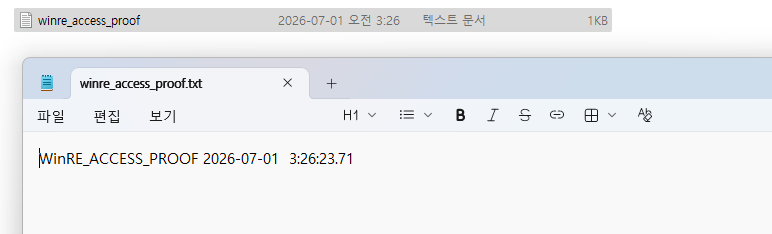
winre_access_proof.txt contains WinRE_ACCESS_PROOF and a timestamp, and the marker file created from the WinRE session shows that writing to the file succeeded.
Closing thoughts
In this article, we directly followed the WinRE boot process and recovery code, which are easy to overlook. The next time you accidentally enter Windows recovery mode, perhaps you will remember that behind the blue recovery screen, a separate WinRE environment has booted and is preparing and running recovery functions.
Did you enjoy the WinRE series? In the next article, we will go one step earlier than WinRE and return to Boot Manager to look at BitPixie: why an older signed Boot Manager can be run again, and what happens during the PXE transition that follows. Please look forward to it!
References
Alon Leviev, Netanel Ben Simon, “BitUnlocker: Leveraging Windows Recovery to Extract BitLocker Secrets,” Microsoft Security Blog, August 13, 2025.
https://techcommunity.microsoft.com/blog/microsoft-security-blog/bitunlocker-leveraging-windows-recovery-to-extract-bitlocker-secrets/4442806Nightmare-Eclipse, “YellowKey: BitLocker Bypass Vulnerability,” GitHub, 2026. (Archived copy)
https://github.com/meltingscales/YellowKeyMicrosoft Security Response Center, “CVE-2026-45585: Windows BitLocker Security Feature Bypass Vulnerability,” Microsoft Security Update Guide, 2026.
https://msrc.microsoft.com/update-guide/vulnerability/CVE-2026-45585Microsoft, “WinPE: Create Apps,” Microsoft Learn.
https://learn.microsoft.com/en-us/windows-hardware/manufacture/desktop/winpe-create-apps

본 글은 CC BY-SA 4.0 라이선스로 배포됩니다. 공유 또는 변경 시 반드시 출처를 남겨주시기 바랍니다.