[Lone Wolves] Analyzing an Android Auto Dongle - Part 1
0. Intro

Hello! This is t0be. Today, I’m back with the next post following the “Lone Wolves” project that gongjae posted earlier! 🐺
Before we begin, though, there’s one thing I’d like to mention. Although we’re working on this project together as a team, each of us has different interests, so it feels like we’re a team, but also not quite a team. Because of this, gongjae’s macOS research article and this post cover completely different topics.
Since I focus on automotive security, my mind naturally went to the vehicle itself or its internal Electronic Control Units (ECUs) at first. Then, a thought suddenly crossed my mind: “What if I look into peripherals instead of the vehicle itself… wouldn’t they be vulnerable?”
While searching for various candidates, a product caught my eye: a wireless Android Auto / CarPlay dongle.
In fact, this was a product I had saved in my shopping cart a while ago because I wanted to use Android Auto wirelessly in my car. Just plug it into the vehicle, pair it with your smartphone, and you’re done! It has quite impressive capabilities for its small size, but I always wondered how secure it actually was.
After all, a third-party device handling Bluetooth, Wi-Fi, and USB simultaneously is introduced right between the vehicle and the smartphone. On top of that, this device processes data displayed on the car’s screen and handles mirroring sessions from the smartphone. What a appetizing target to analyze!
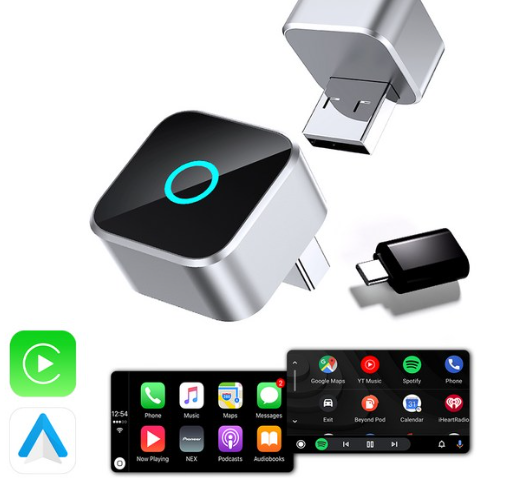
The product I analyzed this time is an Ottocast CP88-M series wireless mirroring dongle sold under the Anniver brand. I bought it directly on Coupang. I physically opened the device, observed its USB communications, obtained its OTA firmware and SPI flash, reverse-engineered it, and verified a few security issues firsthand.
My original plan was simply: “Let’s quickly crack open the firmware and take a look!” However, I ended up diving into everything from RISC-V extended instructions to firmware update structures. Oh dear, I crossed the point of no return 😇
In this article, I will focus on how this dongle works, how I acquired and analyzed the firmware, what I actually verified, and what remains a hypothesis at this stage.
Actually, I couldn’t be the only one who has analyzed a product like this, right? When I started analyzing, I looked for materials covering similar dongles, and sec1.dk’s Reverse Engineering a Wireless CarPlay Adapter — Full Journey caught my attention. It was a comprehensive article covering everything from acquiring firmware to OTA, hardware analysis, flash recovery, and getting a root shell. Thanks to that, I didn’t have to start from scratch and redo all the trial and error without any clues.
Fortunately, our work didn’t overlap completely, which is why I’m able to share this research. The target in the referenced article was based on the Allwinner V851S3 (ARM), while the product I bought turned out to be based on the V821 (RISC-V). Furthermore, even the firmware file structures differed slightly. Therefore, I decided to verify actual behavior and potential vulnerabilities directly on my device.
Scope of Analysis: Tested without an actual vehicle using a CP88-M dongle owned by the researcher and a Pixel 10a. No attacks were performed on vehicle head units, CAN networks, or vehicle control functions.
1. How to work?
1-1. What exactly does an Android Auto dongle do?
First, let me clarify something that confused me at the beginning. Looking at the name alone, doesn’t it feel like just plugging in this dongle would magically add Android Auto functionality to a vehicle that doesn’t support Android Auto at all?
However, the CP88-M analyzed here is essentially an adapter that converts a vehicle’s factory-supported wired CarPlay or Android Auto into a wireless connection. If the vehicle itself does not support these functions natively, plugging in the dongle alone won’t enable them. The manufacturer’s product description also assumes existing wired functionality. I heard there are products that enable Android Auto on unsupported vehicles, but due to the limits of my searching skills, I couldn’t find one.
Looking at the operational principle, it’s surprisingly intuitive:
                 Bluetooth / Wi-Fi                USB
┌──────────────┐      Wireless Conn.   ┌───────────────────┐     Wired Conn.   ┌────────────────┐
│   Smartphone │ <-----------------> │ CP88-M Dongle     │ <-------------> │ Car Head Unit  │
│ Android / iOS│                     │ Linux + BT + Wi-Fi│                   │ (Wired AA/CP)  │
└──────────────┘                     └───────────────────┘                   └────────────────┘

    Wireless Android Auto/CarPlay Receiver     Session Processing & Relay      Behaves like Wired Phone
The dongle acts like a car providing wireless Android Auto/CarPlay to the smartphone, while acting like a smartphone plugged into USB to the car’s head unit. It takes wirelessly received data and passes it to the wired side, and forwards user input or control data from the vehicle back in the opposite direction.
In other words, this product is not a simple USB cable adapter. It can be viewed as a small embedded bridge equipped with its own OS and communication stack to process protocols between two devices.
So, what happens if this device, sitting right in the middle where both devices trust each other, is compromised by an attacker?
Of course, being in the middle doesn’t mean all traffic is automatically decrypted or that arbitrary commands can be executed. That depends on the authentication, encryption, and session state of the actual protocol. However, from an attacker’s perspective, it certainly looks like a juicy device.
1-2. A $30 iPhone?
First, I connected the dongle to my PC and checked the USB descriptor. But I was surprised because no matter how hard I looked, I couldn’t see anything that looked like a dongle.
Bus 003 Device 006: ID 05ac:12a8 Apple, Inc. iPhone
  idVendor           0x05ac Apple, Inc.
  idProduct          0x12a8 iPhone
  iManufacturer           Apple Inc.
  iProduct                iPhone
  bNumConfigurations      4
I connected an Android Auto dongle, but it reported that an Apple iPhone was connected. Whew~ If I were using an iPhone instead of a Galaxy, I almost wouldn’t have found it!
At first, I thought another USB device was captured, but even after disconnecting everything except the dongle, the same values appeared. The dongle was advertising its USB descriptor as an iPhone, rather than an actual iPhone.
| USB Configuration | Feature Identified in Descriptor |
|---|---|
| Configuration 1 | PTP (Picture Transfer Protocol) |
| Configuration 2 | iPod / iAP-related Interface |
| Configuration 3 | Apple Mobile Device, USB Multiplexor |
| Configuration 4 | Apple Mobile Device + USB Ethernet |
CarPlay uses a USB interface alongside an IP-based session. Therefore, to make it appear as if a wired iPhone is connected to the head unit, it needs to provide interfaces like these.
Initially, only Configuration 1 was selected properly, while Configurations 2–4 failed. I wondered, “Is it just impersonating the descriptor without actual functionality?” But once the smartphone was paired and I checked again, the other Configurations became active.
When I set the Pixel and dongle to Android Auto mode, the USB device side of the dongle connected to the PC was now displayed as 2717:ff40 with the product name CAR2. Sending an AOA (Android Open Accessory) control request caused the USB device to re-enumerate, changing its ID to 18d1:2d00. Originally, 18d1:2d00 is defined in the Android AOA documentation as the ID for accessory mode on Android devices. Here, the dongle is imitating that role on the USB port side connecting to the car. First pretending to be an iPhone, and now an Android… it’s quite busy.
AOA_GET_PROTOCOL (Request 51)  -> Version 2
AOA_SEND_IDENT   (Request 52)  -> Send Identification String
AOA_START        (Request 53)  -> Switch to Accessory Mode

USB ID Change: 2717:ff40  ->  18d1:2d00
In short, this product identifies itself as different USB devices in CarPlay and Android Auto modes. As a side note, the USB ID change mentioned above was observed on the dongle connected to the PC, not a case where the Pixel was connected via USB and re-enumerated. Furthermore, confirming the transition to AOA mode does not mean the entire Android Auto session is complete. Although I succeeded in sending the actual AA version request via Bulk OUT, I couldn’t verify responses or TLS sessions because a stack acting as the head unit wasn’t fully set up. I’m trying to borrow a car from people around me, but it’s not easy.
1-3. Why are both Bluetooth and Wi-Fi required?
Even though it’s called wireless mirroring, screen data isn’t transmitted entirely over Bluetooth. Typically, Bluetooth handles device discovery, pairing, and initial connection setup, while high-bandwidth mirroring data utilizes the Wi-Fi/IP path.
I found elements corresponding to this structure in this dongle as well.
| Component | Confirmed Role |
|---|---|
btapp |
Handles Bluetooth connection, uses /dev/ttyS1 |
hostapd |
Operates 5GHz Wi-Fi AP |
wpa_supplicant |
Configures Wi-Fi Direct (P2P) |
udhcpd |
Assigns IP addresses to connected devices |
mdnsd |
Advertises network services |
rcpservice |
CarPlay session and network communication |
raaservice |
Service binary for Android Auto mode |
In practice, the dongle advertised a Wi-Fi AP named CAR2-2F7D, with IP assignments being 192.168.1.101 for the dongle and 192.168.1.102 for the connected Pixel. A Wi-Fi Direct group was also confirmed on the same hardware.
In the Pixel logs, I could observe a flow initiating an RFCOMM connection to a previously registered device and attempting to connect to Wi-Fi using saved credentials. This means automatic reconnection happens without requiring fresh pairing every time. While convenient from a usability perspective, from an attacker’s perspective, it implies that an accessory trusted once will continue to be trusted later. This raised my curiosity regarding how much impact compromising such a device could have on the phone or vehicle side.
Of course, up to this point, these are all normal functionalities. The fact that automatic reconnection occurs doesn’t automatically mean pairing bypasses or data leaks are immediately possible.
2. Firmware Acquisition
Now let’s take a proper look inside. This analysis progressed from USB to wireless network, OTA, flash dump, and binary reverse engineering.
Looking at prior research, update servers and other interfaces could serve as good starting points, but I naturally didn’t expect my device to share the exact same addresses, partitions, or validation logic. Therefore, I decided to proceed step-by-step using values measured directly from my device.
2-1. Firmware Extraction
At first, I wondered if I should teardown the hardware and read the SPI flash right away, as is typical in embedded analysis. While I was naturally preparing my CH341A, I asked my best friend ChatGPT to check it out. After connecting to the dongle’s Wi-Fi, navigating to http://192.168.1.101 brought up the settings page, and it began analyzing the features on its own. (Yay!)
The report generated by ChatGPT showed features like device info, settings modification, and firmware updates on the web UI. Naturally, what interested me most was the Firmware Update—since I might be able to obtain the firmware without tearing down the hardware!
Here, sec1.dk’s analysis post was very helpful. In that post, the author followed the OTA path on the settings page of a similar product to obtain official firmware, outlining a structure where an MD5 string is prepended to the package, followed by a CPIO archive for SWUpdate. Instead of blindly copying those paths, I first checked what URLs my dongle’s web page generated.
Examining cpbox.js and index.html used by the page revealed the update flow:
[Management Page]
    |
    | 1. Check current version (?id=host)
    v
[Request OTA Version Info]
    |
    | 2. Check build/release info in version.json
    v
[Download Firmware Image]
    |
    | 3. Download update.img
    v
[Dongle's Upload CGI]
    |
    | 4. Save to /tmp/update.img & process update
    v
[SWUpdate]
The device version string was 26061510.5140.2, and the update management code used 5140 (corresponding to the model/project line) to construct the OTA object path. At the time of testing, firmware images and version information could be downloaded without authentication from known object paths on the vendor’s OTA repository. It wasn’t that the entire repository directory listing was exposed, but rather that known update object paths were directly accessible.
Obtaining the firmware made me think everything was solved. However, inspecting the file header brought up another problem.
2-2. Encrypted Firmware
Some older images from the same product family had the following structure:
<MD5 Checksum>  update.swu
070702...                 # CPIO (newc + CRC)
  ├── sw-description      # Update Metadata
  ├── kernel              # Kernel Image
  └── rootfs              # Root Filesystem
Here, sw-description is a manifest determining which files SWUpdate installs where. Prior research had already pointed out that confusing 070701 (newc) with 070702 (newc with CRC) causes SWUpdate to reject the package. Thanks to that insight, when handling the package, I checked which CPIO format was used and at which offset in the file the header started.
Indeed, the simple CPIO parser I initially wrote stopped right after reading the first member. Because of the leading MD5 string, the archive start offset wasn’t zero, but alignment calculations were made relative to the beginning of the file. Fixing the alignment reference to the CPIO start offset allowed sw-description, kernel, and rootfs to be read sequentially.
However, in newer model lines closer to my target, normal CPIO headers were still not immediately visible. At first, I wondered if it was an encrypted image. Asking ChatGPT didn’t yield a full recovery either. Downloading the firmware was the easy part…
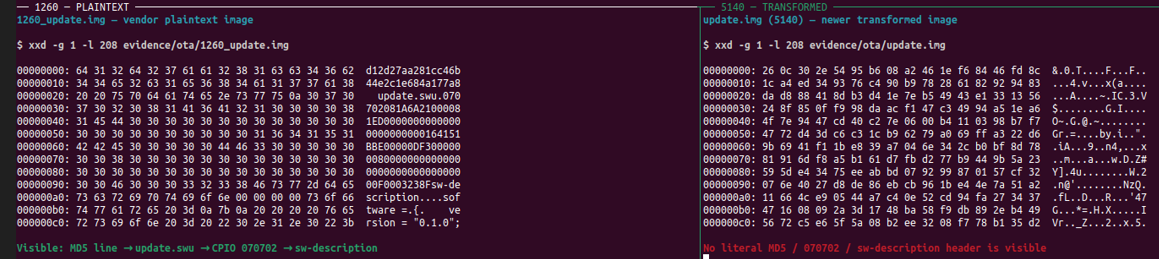
However, while comparing images across various builds, I noticed something strange. Although they were different files, bytes in certain sections were identical. This pattern was hard to explain if independent nonces/IVs were used for encryption per image.
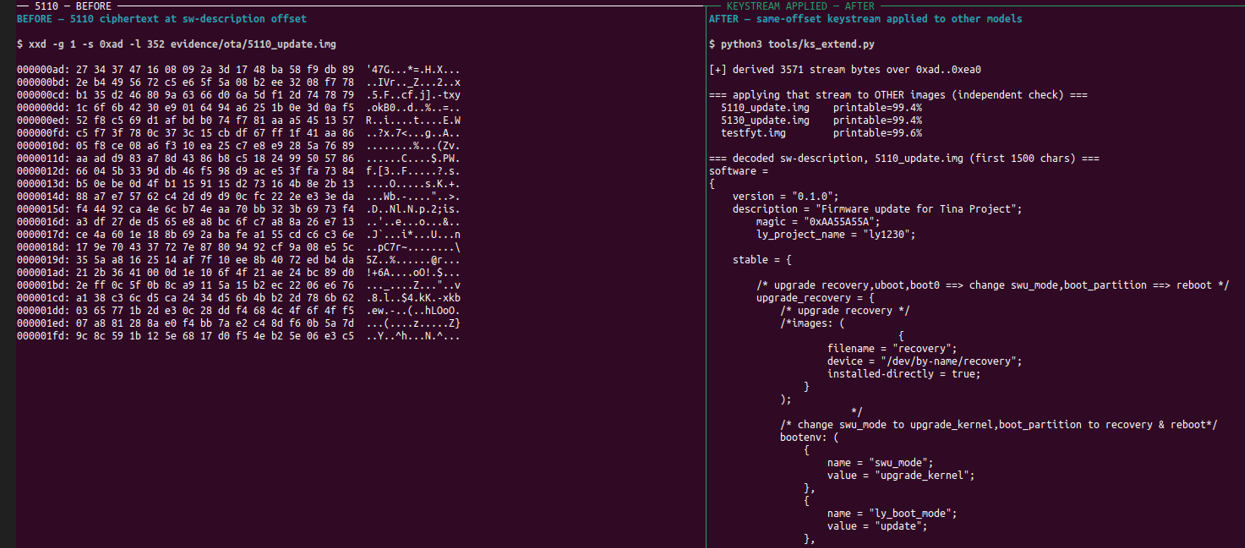
I considered the possibility of a repeating short XOR key and searched for a period, but that wasn’t it either. Hoping to at least recover the header, I downloaded older firmware versions as a last resort… and fortunately, older firmware left on the vendor’s server was in plaintext! I could use the CPIO structure and known parts of sw-description identified earlier as known plaintext.
# Compare identical offsets exclusively within sections where plaintext is available
keystream = bytes(c ^ p for c, p in zip(encrypted_bytes, known_plaintext_bytes))
candidate_plaintext = bytes(c ^ k for c, k in zip(other_encrypted_bytes, keystream))
Applying the keystream recovered from identical positions to images of other models revealed structurally valid sw-description contents. Text encrypted in other models such as 5110/5130 was restored, and model-specific project names were verified normally. By confirming a shared XOR keystream in sections where known plaintext was obtained, it was possible to apply it to subsequent firmwares. Of course, I couldn’t perfectly decrypt every single byte of the latest image. Nevertheless, it clearly demonstrated that XOR-based OTA obfuscation fails to properly protect firmware confidentiality. It was a prime example showing why independent encryption per image is necessary. At this point, one wonders if they even intended to hide it properly.
2-3. Not Satisfied! Bring On the Flash ROM~!
What I got from OTA was primarily the files targeted for updates. To analyze the full boot process and the base rootfs, I needed the full flash. Originally, I planned to clip onto the SPI NOR chip and read it, but after reading the aforementioned sec1.dk article describing a recovery process using Allwinner FEL (USB download mode of the BootROM), I changed my plan.
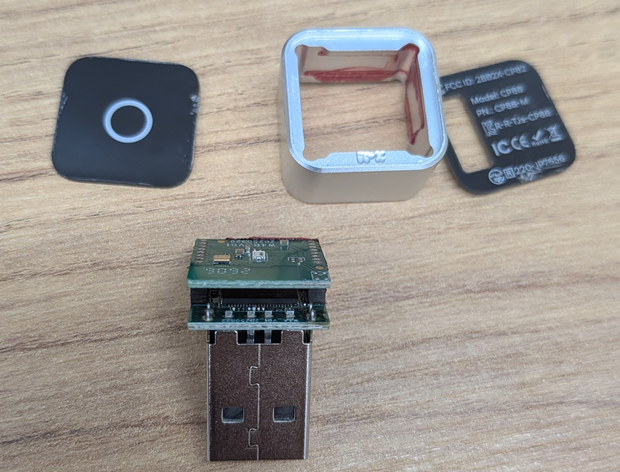
I disassembled it immediately and decided to check the interfaces supported by the device first before attempting soldering or SPI clips.
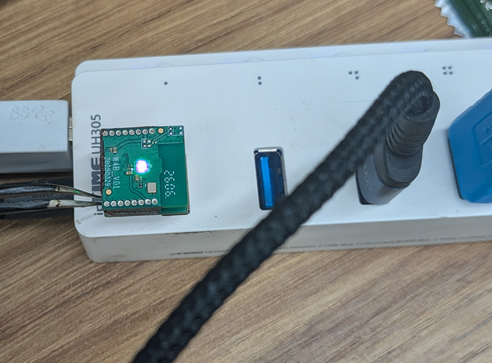
Using tweezers on the relevant pads, I attempted to trigger mode switching. Initially, instead of the expected FEL device, the USB ID changed to 0525:a4a7. I initially noted this in my project notes as A2A Debug Mode, but upon looking it up, I found this ID is used as the CDC ACM example for USB Gadget Serial in the Linux Kernel Documentation. Still, there was no concrete evidence that a debug console actually opened. At any rate, it was clearly not FEL, so I retried several times. Finally, the ID changed to 1f3a:efe8, and xfel recognized it as a V821.
FEL USB enumeration : 1f3a:efe8
xfel version         : AWUSBFEX ID=0x00188200 (V821)
SPI NOR flash        : 16,777,216 bytes (16 MiB)
Looking solely at the TC397 marking on the chip surface, Infineon AURIX/TriCore first came to mind. However, the ID read via USB FEL and the extracted kernel/executables pointed to an Allwinner V821-based RISC-V platform. Judging the SoC purely by chip markings would have led me down the wrong path entirely. As for why it has that marking… I honestly don’t know either.
To ensure the integrity of the extracted firmware, I read the entire binary three separate times and verified that all SHA-256 hashes matched before proceeding with analysis. Having a recoverable original backup made me feel much more at ease, as an incorrect modification could render the device unbootable. With this, all foundational preparation for vulnerability analysis and testing was complete.
Analyzing the dump with binwalk and unsquashfs produced the following results:
| Flash Offset | Identified Component |
|---|---|
0x000000 |
Boot Region (SPL/boot0) |
0x060000 |
Kernel Boot Image |
0x370000 |
Kernel Boot Image Copy |
0x680000 |
SquashFS rootfs |
0xB00000 |
SquashFS customer |
Around 0xED0050 |
JFFS2 Writable Data |
Inside the filesystem, alongside Linux kernel 5.4.220, BusyBox, and musl libc, were device boot scripts, Wi-Fi configurations, a web server, and update utilities. It feels like analyzing a standard embedded Linux device inside this tiny gadget. I expected nothing much, but it was packed quite densely.
As a side note, while organizing this article, I also cross-referenced lvalen91’s C2Air V821 platform analysis notes. Other products in those notes match in several configurations: V821, 16MB SPI NOR, Linux 5.4.220, rootfs at 0x680000 / customer at 0xB00000. While this hints at a common platform across product lines, the offsets and SoC identification above are strictly based on the flash dumps and FEL results I measured directly.
3. Reverse Engineering
Now that we have the firmware, it’s time to analyze the binaries.
However, as mentioned earlier… yes, the binaries are RISC-V 32-bit ELFs. Having prior research available made me think it would be a breeze, but when running some executables in qemu-riscv32, an Illegal instruction occurred, and Ghidra displayed unfamiliar code in the middle of functions.
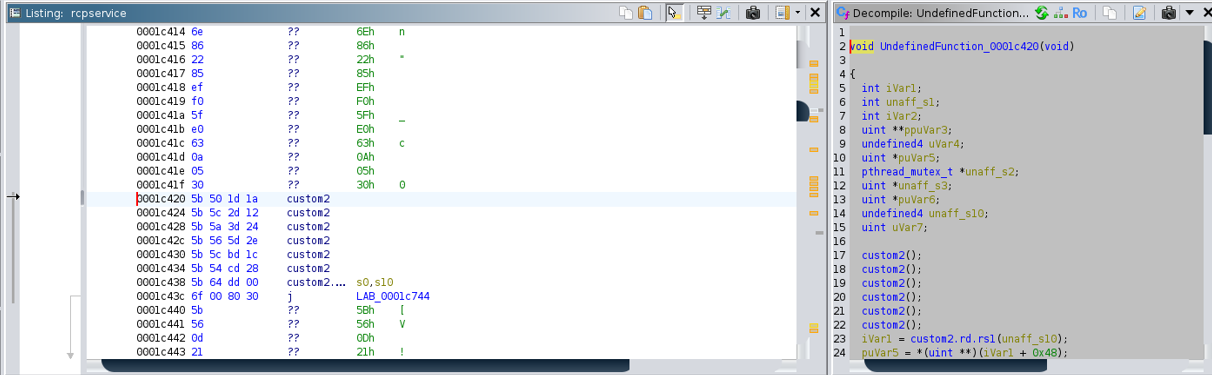
In the past, one would have to look up each instruction manually and fix alignment, but nowadays this isn’t much of a problem.
After feeding it to ChatGPT, I confirmed that Andes vendor extension instructions were being used. If Ghidra fails to interpret these properly, it doesn’t just result in messy pseudocode—string references disappear, branch targets break, and ultimately entire function execution flows get truncated. Of course, just saying “it solved it all” is too result-oriented, so let’s look through the issues together one by one.
Among the analysis targets, about 14.9% of .text in /sbin/update and about 12.3% in index.cgi consisted of these custom opcodes. Left as is, it would be impossible to follow critical request-handling logic properly.
3-1. ADDIGP
While strings in index.cgi could be found in Ghidra, cross-references (xrefs) to those strings were not connected properly. Tracing the cause showed that custom-0 series instructions mapped to Andes ADDIGP, which calculates global addresses.
ADDIGP is used to reference data relative to the Global Pointer (gp). When Ghidra treats this like an unknown function call, it fails to resolve addresses calculated via gp, severing string xrefs.
Initially, I guessed conventional gp values, but results were off by several bytes. What made it even more frustrating was that in dense string regions, wrong addresses still looked like plausible strings. I was so happy thinking I got it right, only to realize I was wrong upon second look.
So I tracked the auipc/addi combination in the ELF initialization code to determine the exact gp value and statistically verified if addresses landed cleanly within actual data sections. As a result, I was able to restore many lost string references in Ghidra.
For example, in index.cgi, recalculating relative to gp=0x17800 resulted in 418 out of 510 candidates (approx. 82%) matching exact starting positions of valid strings. Unlike guessing blindly based on .sdata + 0x800, I could now trace which strings index.cgi was actually referencing.
3-2. BEQC/BNEC
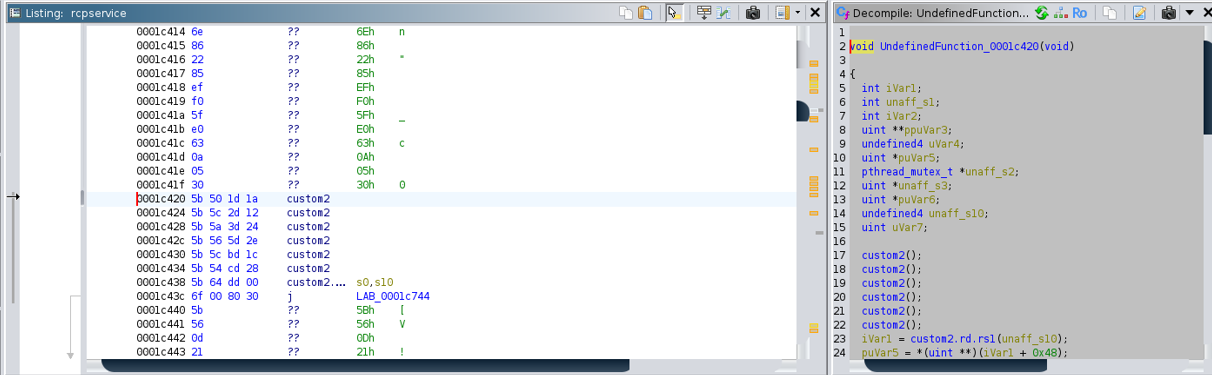
Next was an issue with the command dispatcher in rcpservice. Reading it like standard RISC-V instructions resulted in a series of incomprehensible branches, but inspecting surrounding code revealed a switch structure choosing handlers based on command IDs.
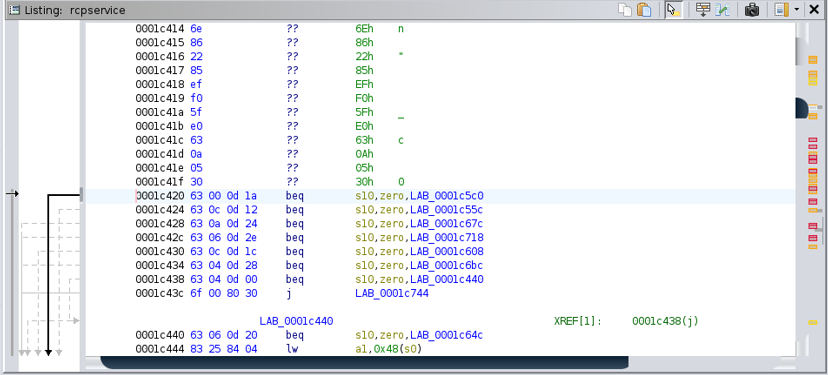
The decisive clues here were the numbers appearing as comparison values:
1, 2, 3, 5, 11, 12, 13, 16Fields that looked like register numbers turned out to be individual command codes! Reinterpreting instruction bits [24:20] as immediate comparison values (cimm) and applying standard RISC-V B-type formatting for branch offsets caused eight branches to lead to valid handler starting addresses.
custom-2 / funct3=5 -> BEQC (Branch if Register == Constant)
custom-2 / funct3=7 -> BNEC (Branch if Register != Constant)

Comparison Immediate: instruction[24:20]
Branch Displacement : RISC-V B-type immediate
Interpreting branch displacements in various ways revealed that 97.5% using standard B-type displacement landed on valid instruction starting points. Other candidates yielded 60–75%, and a simple even-address baseline yielded 63.9%, showing a significant difference. In particular, the 8 commands in rcpservice led precisely to 8 distinct handler starting addresses. For instance, beqc s10, 1 jumps to 0x1c5c0, and beqc s10, 11 jumps to 0x1c608. At this point, I was confident in the decoding logic.
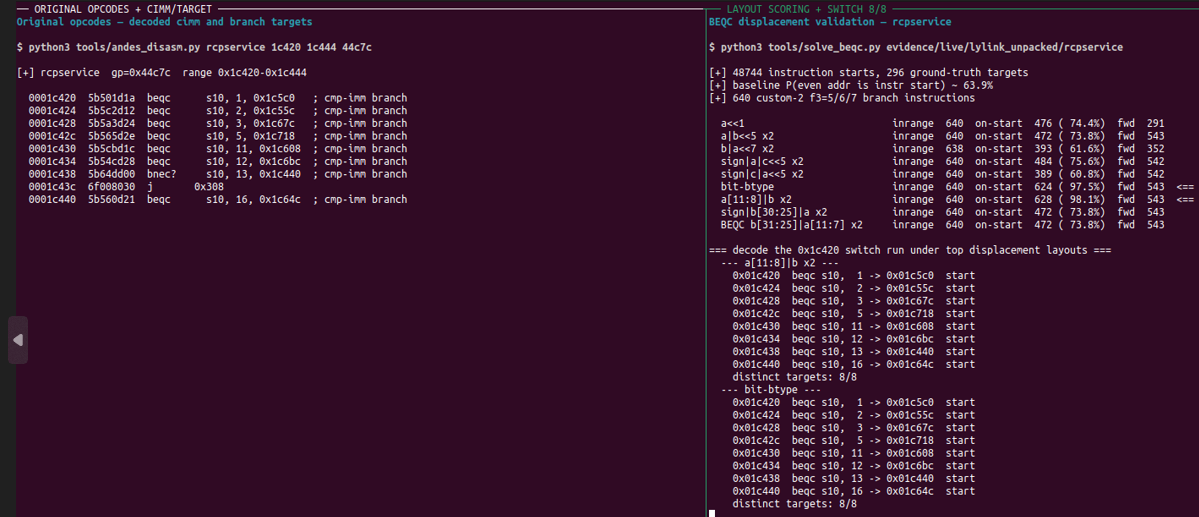
When loading into Ghidra, I patched these branches to standard beq instructions in an analysis copy (rather than the original executable) to reconstruct the Control Flow Graph (CFG). However, there is an important limitation: while branch destinations were preserved, the semantic meaning of comparison conditions wasn’t fully maintained. Therefore, pseudocode obtained this way serves as reference material to follow handler structure, and detailed condition evaluations must be cross-checked against original instructions.
Analyzing an Android Auto dongle only to end up reconstructing RISC-V instruction encodings was quite exhausting… ㅠㅠ
3-3. Runtime Binary Extraction
Following the boot script lyLink.sh, I found that certain services were not placed as ordinary files. This was because a vendor container called lylink was extracted into /tmp/app using lypack before services were executed.
init / rcS
   └── lyLink.sh
         ├── Extract lylink via lypack -> /tmp/app/
         ├── CarPlay Path    : rcpservice, lylinkapp, mdnsd ...
         └── Android Auto Path: raaservice, mtpservice ...
Looking purely at static files meant missing part of the binaries that actually needed analysis. Furthermore, lypack itself relied on Andes instructions, making it unexecutable in standard qemu-riscv32. I wondered if I had to reverse engineer the entire archive format from scratch, but realized I didn’t need to—the actual physical device already unpacks and uses those files during boot!
Once again, I got a hint from prior research. sec1.dk modified the boot script in customer and reflashed via the recovery interface to build an analysis root shell. Referencing the core idea—‘full flash backup → target modification of customer section → write/verify read via FEL’—I adapted it to my device environment by adding a diagnostic CGI. This was necessary because the default BusyBox lacked utilities like telnetd or nc, preventing me from running identical commands directly.
Using physical FEL access and backups, I prepared a modified image for research and obtained an analysis shell with uid=0(root) in that environment. After that, all that was left was to retrieve the binaries the device unpacked into /tmp/app at runtime. A hurdle that nearly required full reverse engineering of an archive format was bypassed through runtime observation.
The files acquired here—such as rcpservice, librcarplay.so, and libriap2.so—allowed me to inspect CarPlay-related network services and parsers in greater detail.
4. Conclusion
It definitely started with “Let’s crack open a $30 dongle,” but plugging it into USB showed an iPhone, fetching the firmware hid the headers, and Ghidra showed nothing but a flood of custom2 instructions.
Still, after obtaining the firmware via OTA, reading the flash via FEL, and pushing through roadblocks caused by Andes instructions, I made it through. Having gathered binaries unpacked to /tmp/app at boot, all the materials needed for analysis are finally collected.
So, what’s next in Part 2? The whole point of buying this dongle was to see if there were vulnerabilities. Now it’s time to dive into vulnerability analysis proper. I plan to examine everything step-by-step, from the dongle’s Wi-Fi and Web API to index.cgi upload handling, and /sbin/update alongside SWUpdate firmware update procedures. I’ll also share what was actually possible and where roadblocks occurred. Finally time for the main course. Got to give it a taste!
Note that the root shell obtained in Part 1 was created by physically opening the device and modifying the firmware to build an analysis environment. This doesn’t mean it was popped remotely—that needs to be analyzed separately.
What started as a lightweight project ended up having much more to look into than expected, extending it into Part 2. Thank you for reading this far! See you in the next post!

본 글은 CC BY-SA 4.0 라이선스로 배포됩니다. 공유 또는 변경 시 반드시 출처를 남겨주시기 바랍니다.