[Two paths, Same Dream] What Happens When a Windows guy Starts Using Android, Part 0 (EN)
0. Introduction
Hello. This is Libera. I hope you had a great Chuseok.
Until now, I’ve focused my research exclusively on Windows, particularly the Windows kernel, but this time I’m planning to branch out from Windows and explore Android. You might be wondering why I’m suddenly switching to Android—it’s because I’m a huge gadget enthusiast, haha… I love having all kinds of gadgets at home—it’s kind of every guy’s dream—so I’d been thinking it would be great to work on IoT and Android. Then, just as we were starting a new project within our team, an Android project caught my eye, so I decided to put Windows aside for a bit and give Android a try, haha.

The name of my team is [Two paths, Same Dream]. It’s called “I-Sang Dong-Mong” because we share the same “dream” of finding vulnerabilities in Android, but we have different “starts”—Samsung and Pixel, respectively. Among these, I plan to focus exclusively on Google Pixel and dive deep into it. I haven’t been able to buy a Pixel phone yet because I’m a bit short on cash, but I plan to use the bounty from finding vulnerabilities in this project to finally make the purchase, haha. So, I plan to conduct my research at the Java framework level, which can be done via emulation.
In this post, I’ll start by covering the IPC (Inter-Process Communication) mechanism, which is the communication structure of the Android ecosystem. In particular, I’ll focus on “Parcel Mismatch,” a logical vulnerability that occurs when data is serialized and transmitted across the isolated memory barrier between processes. Shall we get started?
1. Android IPC and Data Transfer Structure
In the Android ecosystem, apps run in separate, isolated processes by default. Therefore, to pass data from App A or Activity A to App B, you must use an IPC-based communication method, such as Intent.putExtra(“username”, “Libera”).
To understand how data is packaged and transmitted during this process, you need to be familiar with the following three key concepts.
- Intent: An object that contains destination and action instructions, such as “Navigate to a specific screen” or “Launch a specific service.” When passing data, you use the
Extraproperty of this Intent. - Extra Property: An Intent can carry not only a destination but also additional data needed to perform tasks at that destination. The
Extrais the space (property) provided within the Intent to store this data. - Bundle: An object used to bundle and store actual data within an Intent’s
Extraproperty. Internally, it uses a Map data structure—optimized for memory efficiency—to manage data as key-value pairs. - Parcel: A container (memory buffer) that serializes the data contained in a Bundle into bytes so it can be transmitted between processes.
In other words, data is grouped into a Bundle ⇒ loaded into the Extra section of an Intent ⇒ placed into a container called a Parcel and compressed (serialized) into bytes ⇒ then delivered to another process via the Binder kernel driver. This is the flow of IPC communication in Android.
The reason data must be serialized is that, in order to safely cross the memory barriers isolating processes via the Binder kernel driver, it is absolutely necessary to serialize the data according to a specific format and place it inside a Parcel container.
2. Parcel
A Parcel is a memory buffer and serialization container used in Android IPC to transfer data between processes. This buffer can hold not only primitive-type data—such as regular strings, constants, and byte arrays—but also custom objects that implement Parcelable, Android’s dedicated IPC serialization interface.
Here, Parcelable refers to a specialized data specification (interface) designed to transmit objects quickly and efficiently within the Android environment. Serializable, Java’s default serialization method, has the drawbacks of being slow and having high memory overhead due to its internal use of reflection. To address this, the Android OS introduced Parcelable, which maximizes IPC communication performance by requiring developers to explicitly specify the process of packaging and unpacking objects into bytes in their code, rather than leaving it to the system.
Additionally, Parcel provides methods (writeList, readMap, etc.) for directly reading from and writing to standard Java Collection objects such as Array, List, Map, and SparseArray. These collection data structures are important here because they have a nested structure that internally contains other Parcelable objects or sub-collections.
The process of serializing and deserializing a Parcelable object is as follows:
- Serialization (Write): The sender overrides the
writeToParcelmethod to write member variables to the Parcel buffer in the defined order and size. - Deserialization (Read): The receiver reads bytes from the data stream via the
createFromParcelmethod to reconstruct the object in memory.
The most critical security prerequisite here is that the type, size, and order of the data written during serialization (Write) must exactly match the logic used during deserialization (Read).
This is due to the way Parcel stores data; Parcel is essentially a simple, continuous byte stream that does not separately store the boundaries of internal data. Since there are no markers indicating, “This part is an integer, and this part is a string,” the boundaries of data structures are defined solely by the order and logic specified by the developer.
Therefore, if even a single byte is read out of order or with the wrong size compared to how the sender wrote it, the meaning of all subsequent data changes completely.
2-1. Verify Actual Bytes
Having worked exclusively with Windows before switching to Android, there were many aspects that didn’t quite click for me. If you check the bytes yourself, it’ll be easier to understand what a continuous, unbounded byte stream is. Below is the simplest Bundle. I tested it by running the latest version of Android on an emulator.
Bundle b = new Bundle();
b.putString("team", "이상동몽");
b.putInt("part", 0);

00000000  40 00 00 00  42 4e 44 4c  02 00 00 00  04 00 00 00    @...BNDL........
00000010  70 00 61 00  72 00 74 00  00 00 00 00  01 00 00 00    p.a.r.t.........
00000020  00 00 00 00  04 00 00 00  74 00 65 00  61 00 6d 00    ........t.e.a.m.
00000030  00 00 00 00  00 00 00 00  04 00 00 00  74 c7 c1 c0    ............t...
00000040  d9 b3 bd ba  00 00 00 00                              ........
In BNDL, when you find this section using Magic, you can assume that this is where the bundle begins. If you look at the bytes, you’ll see that the string you passed as an argument appears exactly as is. “이상동몽” starts at 0x0038, haha.
If you break down the entire 72 bytes into segments, it looks like this.
Header: 8 bytes
  0x0000  40 00 00 00                 Length L = 64   ← Number of bytes from the end of the magic number to the end
  0x0004  42 4e 44 4c                 “BNDL” Magic   ← “Bundle” starts here

Body: 64 bytes (0x0008 to 0x0047; this is the range pointed to by L)
  0x0008  02 00 00 00                 Number of entries N = 2
  0x000c  Entry 0                     key “part” + type tag 01 (VAL_INTEGER) + value 0
  0x0024  Entry 1                     key “team” + type tag 00 (VAL_STRING)  + value “이상동몽”

If we break down Entry 1 further,
  0x0024  04 00 00 00                 Key length = 4 (number of characters)
  0x0028  74 00 65 00  61 00 6d 00    key "team" (UTF-16LE)
  0x0030  00 00 00 00                 NUL + Alignment Padding
  0x0034  00 00 00 00                 NUL + alignment padding type tag = 0 → VAL_STRING
  0x0038  04 00 00 00                 Value length = 4 (number of characters)
  0x003c  74 c7 c1 c0  d9 b3 bd ba    Value "이상동몽" (UTF-16LE)
  0x0044  00 00 00 00                 NUL + Alignment Padding
The first 8 bytes serve as a header. If you look at the BNDL at 0x0004, you’ll see that the Bundle starts here, and the L=64 at 0x0000 means that the 64 bytes following the magic number constitute the body of this Bundle. If you specify the length at the beginning, you can skip the entire section without even looking at the contents. We’ll revisit this idea later in the “Lazy Bundle” section.
There’s one distinction to note here: the L at 0x0000 represents the total length of the entire Bundle. The prefixes for Lazy Bundles, which we’ll see later, are separate numbers attached to each individual entry. The reason you don’t see entry-specific prefixes in this dump is that prefixes aren’t added for types with a fixed size, such as String or int.
Now let’s look at the type tags. Each value has its own tag. You’ll see 01 (VAL_INTEGER) before part and 00 (VAL_STRING) before team. The reader looks at these numbers to determine whether to read an int or a String.
However, since these tags are just 4-byte numbers, if their position shifts, the reader will misinterpret the data as the wrong type. I tested reading the same bytes in two different ways.
[A] Read It As It Is Written
    0x0000  Length L = 64
    0x0004  Magic = 0x4c444e42
    0x0008  Number of entries N = 2
    #0  key(0x000c)="part"   Type tag (0x001c) = 1 → VAL_INTEGER   Value = 0
    #1  key(0x0024)="team"   Type tag (0x0034)=0 → VAL_STRING   Value = "이상동몽"
    Bytes remaining = 0

[B] A parser that reads 4 bytes less of the first value
    0x0000  Length L = 64
    0x0004  Magic = 0x4c444e42
    0x0008  Number of entries N = 2
    #0  key(0x000c)="part"   Type tag (0x001c)=1 → VAL_INTEGER   Value = 0
          ↑ Assuming that 4 bytes were not read, rewind
    #1  key(0x0020)=null   타입태그(0x0028)=6619252 → Undefined type   value = (Unreadable, stopped)
    Bytes remaining = 28
Where did the 6619252 in [B] come from? If you look up 0x0028 in the dump, it’s 74 00 65 00. The two bytes that originally represented the characters “t” and ‘e’ in “team”—two characters in the string—were interpreted as a data type number. The key becomes null, and 28 bytes remain unread—all because of just 4 bytes.
There’s one more thing that catches my eye. The 04 00 00 00 at 0x0024 originally represented the length of “team” (4), but coincidentally, the number for VAL_PARCELABLE is also 4. If Milim causes that position to be read as a type tag, the parser will think, “Oh, there’s an object here,” and try to find the class to create an instance. This is exactly what the Self-changing Bundle we’ll look at below is aiming for.
For reference, this type tag was also present in Android 12. It’s absolutely necessary for Parcel to know what to read when retrieving values. What Android 13 added wasn’t a tag, but a length prefix attached to each item. In other words, “what type this is” was already specified; the problem was that there was no boundary indicating “this is the end of one item.”
Now, let’s take a look at an Intent. This time, I opened an Intent that contained the Bundle mentioned above in its Extras.
Intent i = new Intent("com.libera.lab.ACTION_PROBE");
i.setData(Uri.parse("content://com.libera.lab/notes/7"));
i.addCategory(Intent.CATEGORY_DEFAULT);
i.putExtra("team", "이상동몽");
i.putExtra("part", 0);

00000000  1b 00 00 00  63 6f 6d 2e  6c 69 62 65  72 61 2e 6c    ....com.libera.l
00000010  61 62 2e 41  43 54 49 4f  4e 5f 50 52  4f 42 45 00    ab.ACTION_PROBE.
00000020  01 00 00 00  20 00 00 00  63 6f 6e 74  65 6e 74 3a    .... ...content:
00000030  2f 2f 63 6f  6d 2e 6c 69  62 65 72 61  2e 6c 61 62    //com.libera.lab
00000040  2f 6e 6f 74  65 73 2f 37  00 00 00 00  ff ff ff ff    /notes/7........
00000050  ff ff ff ff  00 00 00 00  00 00 00 00  ff ff ff ff    ................
00000060  ff ff ff ff  00 00 00 00  01 00 00 00  1f 00 00 00    ................
00000070  61 6e 64 72  6f 69 64 2e  69 6e 74 65  6e 74 2e 63    android.intent.c
00000080  61 74 65 67  6f 72 79 2e  44 45 46 41  55 4c 54 00    ategory.DEFAULT.
00000090  00 00 00 00  00 00 00 00  fe ff ff ff  40 00 00 00    ............@...
000000a0  42 4e 44 4c  02 00 00 00  04 00 00 00  70 00 61 00    BNDL........p.a.
000000b0  72 00 74 00  00 00 00 00  01 00 00 00  00 00 00 00    r.t.............
000000c0  04 00 00 00  74 00 65 00  61 00 6d 00  00 00 00 00    ....t.e.a.m.....
000000d0  00 00 00 00  04 00 00 00  74 c7 c1 c0  d9 b3 bd ba    ........t.......
000000e0  00 00 00 00  00 00 00 00                              ........
Just as I saw with the Bundle, you can see a continuous byte stream that shows the exact order in which the data was written.
However, looking at this dump alone made me wonder, “So where exactly does the Bundle start and end, and where is the Parcel?” So I decided to check it out.
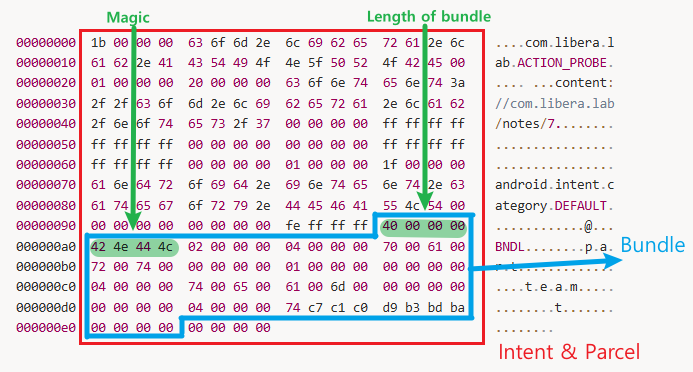
Now you can see it at a glance. Intent and Parcel represent the whole concept, and Bundle exists within them.
So, what’s the difference between an Intent and a Parcel? An Intent is the content, while a Parcel is the buffer that holds that content. A Parcel does not have its own fields. Everything is either a value held by the Intent or incidental bytes resulting from the Parcel’s writing rules (4-byte string length, NUL, and 4-byte alignment padding).
The Parcel Mismatch explanation below is based on Android 12, but the type tags attached to each value—as seen above—remained the same at that time. The only thing that was missing was the length prefix attached to each item, so please keep that in mind as you read. Haha.
3. Parcel Mismatch
When a read operation on the Parcel buffer occurs on the recipient’s side, the parser deserializes all of its contents sequentially from start to finish.
](image_1.png)
If you look at the image above, you can see that the outer ArrayList container holds the string “abc,” the integer 123, Parcelable (P1), and another list, List L1. Furthermore, if you look inside this List L1, you’ll see various elements—such as strings, integers, Parcelable, and Serializable—nested in layers upon layers.
In other words, when the deserialization process begins, it doesn’t simply stop after reading the outermost layer; starting with the very first element (the string “abc”), every element—all the way down to those inside the deepest Map—is deserialized in a chain reaction.
But what happens if a discrepancy arises between the “amount written” and the “amount read” due to a specific logic error or a developer’s mistake? Let’s take a look at the code below.
Parcelable Write (Transmission Logic)
public void writeToParcel(Parcel parcel, int flags) {
    parcel.writeInt(f1);
    parcel.writeByteArray(f2);
}
Parcelable Read (Receive Logic)
f1 = parcel.readInt();
if (f1 > 0) {
    parcel.readByteArray(f2);
}](image_2.png)
Looking at the vulnerable code pattern above, when sending data, the integer f1 and the byte array f2 are always serialized and written to the buffer. On the other hand, when receiving data, if the value of the integer f1 is less than or equal to 0, the readByteArray(f2) function is not executed due to the if statement, causing the entire array read operation to be skipped.
](image_3.png)
The photo above shows the moment when a single logic mismatch causes the parsing offset to go out of sync.
Unless an exception is thrown immediately upon encountering the first data, the Android parser does not stop and continues to attempt to parse subsequent data. However, because the remaining data from the byte array—which was left unread in the previous step—remains in the buffer, all subsequent data is parsed incorrectly starting from a completely wrong position (offset), leading to critical sequential data corruption.
4. Self-changing Bundle
This “Parcel Mismatch” issue, which appears to be a simple data corruption problem, can be exploited by hackers as a powerful weapon known as a “self-changing bundle.”
Bundle b = new Bundle();
// Fill b
Bundle c = new Bundle(b.writeToParcel());
// b.writeToParcel => 직렬화(Serialization)
// new Bundle() => 역직렬화(Deserialization)
A “self-changing bundle” refers to an anomalous bundle where the contents logically change (b != c) when the original bundle (b) is serialized once and then deserialized and assigned to a new bundle (c).
Let’s examine how this “magic” is used in an attack through the IPC flow: Process A (attacker) ➔ B (security verification) ➔ C (final execution).
Attacker A’s goal is to cleverly hide malicious data (e.g., intent => 42) so that the defense system B cannot detect it, pass it through, and then have it executed at the final destination, C.
](image_4.png)
The vulnerable package used in the attack has a mismatch error, as shown in the image above, where “only 4 bytes are read (readInt) but 8 bytes are written (writeLong).”
](image_5.png)
An attack scenario exploiting this vulnerability unfolds as follows.
(In the image, A(H) represents the bundle header, A0 represents the vulnerable package, and A1 represents the hidden malicious Intent.)
A ➔ B Transmission and Parsing by B (TOC: Time of Check):
A sends data to B. When B deserializes the data for inspection,
readInt()is called on the first vulnerable element (A0), reading only 4 bytes.
The maliciously placed Intent (A1), positioned immediately afterward, is not parsed as an object but is treated as simple byte array data, allowing it to successfully bypass B’s security checks.Variation During the B ➔ C Retransmission Process:
After completing the checks, B performs deserialization again to pass the data to C. At this point,
writeLong()is called in the vulnerable package, appending four meaningless zeros after the original 4-byte “0,” resulting in a total of 8 bytes being written.Parsing and Privilege Escalation in C (TOU: Time of Use):
C deserializes the data received from B. C also calls
readInt()on the vulnerable component, reading only the first 4 bytes of the 8-byte block and stopping there.
At this very moment, the remaining 4 bytes of meaningless data generated by B are left in the parsing pointer. C mistakenly interprets these remaining 4 bytes as the key length for the next item (A1).
As a result, the parsing position is shifted exactly, causing a byte array that was previously treated as simple data to become the target of deserialization. Through the parsing process, it is resurrected as a new, fully formed malicious Intent object, ultimately leading to critical issues such as privilege escalation.
5. Android 13 Introduces ‘Lazy Bundle’
The fundamental reason why this “Parcel Mismatch” could have become a system-wide catastrophe was the “eager deserialization” approach used up to Android 12.
In the Android 12 environment, even when querying just a single specific item within a Bundle, the entire Bundle would be deserialized all at once. In other words, even the remaining items that were not immediately needed were all parsed, converted into actual objects, and then loaded into the Map.
](image_6.png)
Let’s assume that P1 and P2 were inserted into the Parcel buffer (cylinder) in that order, as shown in the photo above. If a mismatch occurs in the P1 class—causing it to read less than the intended amount—reading the second item, k2, and P2 would start from the incorrect offset, corrupting the interpretation of the entire bundle. This issue was an unavoidable limitation because the boundaries of the structure were defined solely by the data (payload) and the developer’s code.
](image_7.png)
To address this, Google has introduced a highly intuitive and robust solution. To ensure that a mismatch in one item does not affect others, they restructured the format to include a prefix specifying the number of bytes used for serialization (prefix item length).
By specifying the length before each item in this way, even if a mismatch occurs in an internal object (P1), the parser remains unaffected and can skip exactly the number of bytes indicated in the prefix to access the correct offset for the next item (P2).
](image_8.png)
Based on this length information, a key feature introduced in Android 13 is “Lazy Bundle.”
Now, when a Bundle is unpacked using a key, not all items are dumped and deserialized at once. For example, if a user queries only the first item, only that first item is deserialized into an actual object (Live Object), while the remaining items are stored in a Map as “Lazy Values.”
This lazy value container holds only a reference to the compressed backing Parcel (the original byte stream) and the metadata needed to deserialize each item later; deserialization occurs only when the data is actually needed.
As a result, by preventing unnecessary chained reads (Lazy) and clearly defining the boundaries (Prefix) between items, it effectively blocks malicious offset manipulation attacks, such as those involving “Self-changing Bundles,” at the source.
5-1 Let’s check the length prefix in bytes.
Let’s take a look at what the diagrams P1 and P2 above look like in actual bytes. I tested this by including two Parcelables in the bundle.
Bundle b = new Bundle();
b.putParcelable("k1", new Intent("A"));
b.putParcelable("k2", new Intent("B"));

00000000  14 01 00 00  42 4e 44 4c  02 00 00 00  02 00 00 00    ....BNDL........
00000010  6b 00 31 00  00 00 00 00  04 00 00 00  74 00 00 00    k.1.........t...
00000020  16 00 00 00  61 00 6e 00  64 00 72 00  6f 00 69 00    ....a.n.d.r.o.i.
00000030  64 00 2e 00  63 00 6f 00  6e 00 74 00  65 00 6e 00    d...c.o.n.t.e.n.
00000040  74 00 2e 00  49 00 6e 00  74 00 65 00  6e 00 74 00    t...I.n.t.e.n.t.
00000050  00 00 00 00  01 00 00 00  41 00 00 00  00 00 00 00    ........A.......
00000060  ff ff ff ff  ff ff ff ff  00 00 00 00  00 00 00 00    ................
00000070  ff ff ff ff  ff ff ff ff  00 00 00 00  00 00 00 00    ................
00000080  00 00 00 00  00 00 00 00  fe ff ff ff  ff ff ff ff    ................
00000090  00 00 00 00  02 00 00 00  6b 00 32 00  00 00 00 00    ........k.2.....
000000a0  04 00 00 00  74 00 00 00  16 00 00 00  61 00 6e 00    ....t.......a.n.
If you calculate the number 74 00 00 00 highlighted in red, it equals 116. This is the length prefix added in Android 13. When applied, it is interpreted as shown below.
Start of the payload for item 1  0x0020
            + Length prefixes  116 (0x74)
            ───────────────────
Start with the key for item 2        0x0094   ← Exactly matches the K2 location in the actual dump
In other words, regardless of the contents of entry 1, the length prefix written at 0x001c indicates where entry 2 begins. Even if a mismatch occurs in entry 1, the parser jumps to the starting point of entry 1 plus 116 and reads entry 2 normally.
6. CVE-2025-48535

Earlier, we discussed why Parcel Mismatch occurs in Android 12 and how it was patched in Android 13. Since it would be a shame to cover only theoretical concepts, let’s take a look at how Parcel Mismatch actually occurs!
Even after the introduction of Lazy Bundles, a technique that triggers mismatches has emerged: the CVE-2025-48535 vulnerability. This vulnerability occurred in the Settings app, which has system privileges, and allows an attacker to execute any arbitrary Activity with system privileges. The root cause is “Creator Mismatch,” a type of mismatch we’ll be exploring.
So, what exactly is a Creator Mismatch?
It refers to a mismatch that occurs when transmitting Parcelable objects in Android because the standards of the writer and reader are completely different.
- Serialization (Writing): Uses the
writeToParcel()method of the object’s “actual runtime type.” - Deserialization (Reading): It uses the
CREATORstatic method of the “declared type” expected by the code.
Exploiting this asymmetry, the attacker sent malicious data to the Settings app not in a Intent object—a common parent class—but in a LabeledIntent object, which is a subclass of Intent.
Let’s briefly touch on what a LabeledIntent is.
A LabeledIntent is a “subclass” created by the framework by extending the standard Intent to contain custom label text and icon information to be displayed on Android screens (e.g., the share menu, app selection window, etc.). Because it is a child of Intent, it was able to successfully pass the system’s type-checking process.
The created LabeledIntent object is assigned to a parent-type variable named Intent restrictionsIntent. Since Java allows assigning a child object to a parent variable (upcasting), this assignment passed the type check.
If you look at the actual AOSP code below, you’ll see that when LabeledIntent is serialized, it first writes the fields of its parent (Intent) and then appends its own four unique trailing fields (label, icon, etc.) before sending the data.
// frameworks/base/core/java/android/content/pm/LabeledIntent.java:28
public class LabeledIntent extends Intent {
    private String mSourcePackage;
    private int mLabelRes;
    private CharSequence mNonLocalizedLabel;
    private int mIcon;

    // :162 — Write “Parents” first, then add the four fields
    public void writeToParcel(Parcel dest, int parcelableFlags) {
        super.writeToParcel(dest, parcelableFlags);
        dest.writeString(mSourcePackage);                                   // String16
        dest.writeInt(mLabelRes);
        TextUtils.writeToParcel(mNonLocalizedLabel, dest, parcelableFlags); // CharSequence
        dest.writeInt(mIcon);
    }
}
One point to note here is that this first serialization—where the attacker’s app passes data to Settings—poses no problem. The class name android.content.pm.LabeledIntent is included in the Bundle, and the receiving end uses that string to select and use LabeledIntent.CREATOR. Since it’s LabeledIntent when written and LabeledIntent when read, the match is correct, and it’s read exactly up to the four-byte tail. In other words, once this step is complete, Settings has a complete LabeledIntent object with all tail values filled in, and there are no unread bytes left over.
So you might be wondering, what’s the problem? The “Creator Mismatch” error occurs next—when Settings deserializes this object and sends it to another process.
- Sender: It calls
writeToParcel(), which is an instance method, so the method for the object’s actual runtime type (LabeledIntent) is invoked. Consequently, the parent plus the four tail bytes are sent. - Receiving side: It uses the
CREATORof the declared type specified there. If that’sIntent.CREATOR, it reads only up to the parent schema and stops.
As a result, the four “tails” aren’t read and remain in the Parcel, getting pushed into the space reserved for other data that follows.
6-1. Bundle dump sent by the attacker
Now let’s take a look at what the attacker is actually sending and how the length prefix we saw earlier works with this payload.
Bundle out = getResultExtras(true);
out.putParcelable(Intent.EXTRA_RESTRICTIONS_INTENT,
        new LabeledIntent(base, "text/plain", PackageManager.MATCH_DEFAULT_ONLY, 0x4141));
setResultExtras(out);

00000000  30 01 00 00  42 4e 44 4c  01 00 00 00  28 00 00 00    0...BNDL....(...
00000010  61 00 6e 00  64 00 72 00  6f 00 69 00  64 00 2e 00    a.n.d.r.o.i.d...
00000020  69 00 6e 00  74 00 65 00  6e 00 74 00  2e 00 65 00    i.n.t.e.n.t...e.
00000030  78 00 74 00  72 00 61 00  2e 00 72 00  65 00 73 00    x.t.r.a...r.e.s.
00000040  74 00 72 00  69 00 63 00  74 00 69 00  6f 00 6e 00    t.r.i.c.t.i.o.n.
00000050  73 00 5f 00  69 00 6e 00  74 00 65 00  6e 00 74 00    s._.i.n.t.e.n.t.
00000060  00 00 00 00  04 00 00 00  cc 00 00 00  20 00 00 00    ............ ...
00000070  61 00 6e 00  64 00 72 00  6f 00 69 00  64 00 2e 00    a.n.d.r.o.i.d...
00000080  63 00 6f 00  6e 00 74 00  65 00 6e 00  74 00 2e 00    c.o.n.t.e.n.t...
00000090  70 00 6d 00  2e 00 4c 00  61 00 62 00  65 00 6c 00    p.m...L.a.b.e.l.
000000a0  65 00 64 00  49 00 6e 00  74 00 65 00  6e 00 74 00    e.d.I.n.t.e.n.t.
000000b0  00 00 00 00  19 00 00 00  63 6f 6d 2e  6c 69 62 65    ........com.libe
000000c0  72 61 2e 63  76 65 34 38  35 33 35 2e  50 52 4f 42    ra.cve48535.PROB
000000d0  45 00 00 00  00 00 00 00  ff ff ff ff  ff ff ff ff    E...............
000000e0  00 00 00 00  00 00 00 00  ff ff ff ff  ff ff ff ff    ................
000000f0  00 00 00 00  00 00 00 00  00 00 00 00  00 00 00 00    ................
00000100  fe ff ff ff  ff ff ff ff  00 00 00 00  0a 00 00 00    ................
00000110  74 00 65 00  78 00 74 00  2f 00 70 00  6c 00 61 00    t.e.x.t./.p.l.a.
00000120  69 00 6e 00  00 00 00 00  00 00 01 00  01 00 00 00    i.n.............
00000130  ff ff ff ff  41 41 00 00                              ....AA..
If you look at 0x006c, you can see that android.content.pm.LabeledIntent is embedded there as-is. This is the LabeledIntent class name—the one I mentioned earlier that determines which CREATOR runs on the receiving end—and it’s right here. Following that, starting at 0x00b4, are the fields of the parent Intent, and from 0x010c to 0x0138 are the four tails in question.
At 0x0068, you can see the length prefix; this value of 204 is functioning correctly. If there had been additional Bundle entries in this section, the next entry would be read normally regardless of what happens inside the LabeledIntent.
What the attacker secured from this Bundle was the class name set to LabeledIntent, causing the Settings app to restore the object as that type. Problems arise after this object is retrieved by the Settings app: it is deserialized again through a different channel that lacks a length prefix, yet the object remains a LabeledIntent. In other words, the four “tails” are written back exactly as they were. The “channel” referred to here is the Binder call—which we’ll see below—where Settings requests a check from PMS.
7. LaunchAnyWhere caused by a Creator Mismatch.
Before launching this LabeledIntent object, the Settings app checks whether “this is a safe destination.” However, rather than performing this check itself, it asks the system service (PMS) to verify it. In other words, the object must be sent to the PMS, and to do so, it must be deserialized again. This is precisely the point mentioned earlier where the object is deserialized and sent.
// Code that runs within the Settings process
// AppRestrictionsFragment.java:662
private Intent assertSafeToStartCustomActivity(Intent intent) {
[1] // The object selected by the attacker is passed to the PMS across the Binder boundary!
		// Serialization → Transmission → PMS deserialization → Receipt of results—the entire round trip is completed in this single line.
    ResolveInfo resolveInfo = mPackageManager.resolveActivity(
            intent, PackageManager.MATCH_DEFAULT_ONLY);                  // :668

    // ... (Interim Check Logic) ...

[2] // Normalization that converts a new Intent back to a plaintext Intent with a runtime type.
		// There is a normalization code, but it's executed only after all the checks are complete.
    final Intent vettedIntent = new Intent(intent);                      // :683
    vettedIntent.setComponent(activityInfo.getComponentName());          // :684
    vettedIntent.setPackage(activityInfo.packageName);                   // :685
    return vettedIntent;
}
The resolveActivity method called at [1] in the code above communicates internally with the system service (PMS) via AIDL. Settings serializes an object and sends it to PMS, then receives the resolution result (ResolveInfo) from PMS. The Binder interface called at this point looks like this:
// frameworks/base/core/java/android/content/pm/IPackageManager.aidl:133
ResolveInfo resolveIntent(in Intent intent, String resolvedType, long flags, int userId);
Following the single in Intent intent parameter, three parameters—string, long, int—are waiting in sequence. When the Stub (receiver) reads the parameters in order, it is precisely at this point that the trailing fields left in the buffer are pushed into the slots for the subsequent parameters and parsed!
This call is sent as a single Binder transaction. The four arguments listed in the declaration above are packed sequentially into a single Parcel, which passes through the kernel Binder driver, and the receiving Stub extracts and reads them in the same order. AIDL is the declaration that specifies this order, but it is actually this Parcel that crosses the process boundary.
Inside the Bundle, each item was prefixed with its length, so it worked fine, but the arguments in this Parcel are written sequentially after in Intent as String, long, int without any prefixes. That’s why a problem occurs as soon as a mismatch happens.
Let’s take a look at what the transaction Parcel actually looks like.
00000000  01 00 00 00  19 00 00 00  63 6f 6d 2e  6c 69 62 65    ........com.libe
00000010  72 61 2e 63  76 65 34 38  35 33 35 2e  50 52 4f 42    ra.cve48535.PROB
00000020  45 00 00 00  00 00 00 00  ff ff ff ff  ff ff ff ff    E...............
00000030  00 00 00 00  00 00 00 00  ff ff ff ff  ff ff ff ff    ................
00000040  00 00 00 00  00 00 00 00  00 00 00 00  00 00 00 00    ................
00000050  fe ff ff ff  ff ff ff ff  00 00 00 00  0a 00 00 00    ................
          ↑ The tail starts at 0x005c ────────────┘
00000060  74 00 65 00  78 00 74 00  2f 00 70 00  6c 00 61 00    t.e.x.t./.p.l.a.
00000070  69 00 6e 00  00 00 00 00  00 00 01 00  01 00 00 00    i.n.............
00000080  ff ff ff ff  41 41 00 00  ff ff ff ff  00 00 01 00    ....AA..........
                                    ↑ Starting at 0x0088 are the “intended” arg1 through arg3
00000090  00 00 00 00  00 00 00 00                              ........
There are two key points here. The writing side wrote up to 0x0088 in arg0, but the reading side’s Intent.CREATOR starts reading from 0x005c—in other words, the 44-byte gap between these two points is where the mismatch occurs.
Let’s summarize in a table how this offset shift causes the values to become distorted.
| AIDL Arguments | The value intended for “Settings” | The value actually read by the PMS (offset drift) | In terms of offset, |
|---|---|---|---|
intent |
Attacker Intent | Attacker Intent (So far, so good) | 0x0000~0x005c |
resolvedType |
null | “text/plain” ➔ mSourcePackage |
0x005c |
flags |
0x10000 |
0x0000000100010000 ➔ The lower 32 bits represent mLabelRes, and the upper 32 bits represent the TextUtils marker |
0x0078~0x0080 |
userId |
0 | -1 ➔ Label string length field | 0x0080 |
As a result, none of the system’s intended validation conditions function as intended, and they are replaced with flags and conditions manipulated by the attacker. Based on these manipulated values, the resolveInfo returned by PMS points to the attacker’s package, causing the Settings app to mistakenly believe it is safe and execute it with system privileges (System UID).
So, how exactly was the vulnerability patched?
The patch was implemented by moving the normalization code to the front of the call, and the vulnerability was fixed with just a single line of code. The new Intent(intent) statement in the original code [2] served to preserve the field values while reverting the runtime type to plain Intent—and this code was simply moved to the front.
private Intent assertSafeToStartCustomActivity(Intent intent) {
[1] // Moving normalization to before the Binder boundary (removing subclass tag dictionaries)
+    final Intent vettedIntent = new Intent(intent);

     ResolveInfo resolveInfo = mPackageManager.resolveActivity(
[2] // The items to be inspected will also be replaced with normalized copies rather than the originals
-            intent, PackageManager.MATCH_DEFAULT_ONLY);   // Removed.
+            vettedIntent, PackageManager.MATCH_DEFAULT_ONLY);

     // ...
     // Remove any normalization that was done late
-    final Intent vettedIntent = new Intent(intent);       // Removed.
     vettedIntent.setComponent(activityInfo.getComponentName());
     vettedIntent.setPackage(activityInfo.packageName);
     return vettedIntent;
 }
Since normalization is now performed “before” crossing the Binder boundary, any tail fields added by subclasses are thoroughly removed in advance. This ensures that only the plaintext Intent schema remains during serialization, thereby preventing a Creator Mismatch from occurring.
8. In Closing

So far, we’ve covered everything from the fundamental concepts of Intent, Bundle, and Parcel—which form the foundation of Android IPC communication—to how even a tiny serialization mismatch can lead to privilege escalation, how Google addressed this through architectural improvements (Lazy Bundle), and the recent Parcel Mismatch 1-day vulnerability.
As you can see, the Android ecosystem seems to have its own unique appeal, distinct from Windows. Of course, as someone who understands OS architecture based on Windows, there were many parts I didn’t grasp, but learning new things is truly fun. (It also seems like a great excuse to justify buying new phones, haha.)
Through this Part 0, I was able to learn about how Android exchanges data. In the next post, another member of our [I Sang Dong Mong] team will return with an article covering a different topic.
Thank you for reading this long post. This has been Libera from the I Sang Dong Mong team! (Next time, I’ll definitely say hello while holding an actual Pixel phone, haha.)

본 글은 CC BY-SA 4.0 라이선스로 배포됩니다. 공유 또는 변경 시 반드시 출처를 남겨주시기 바랍니다.