[Lone Wolves] A Windows-Only Guy Headbutting His Way Into macOS — Part 0 (EN)

Introduction
Hello! It’s gongjae, back after a little while 👋
The [Wipeload] series wrapped up without a hitch across 9 parts. It did a lot for me, and once it was over I honestly had a lot to think about for what came next haha.. Our team figured that writing research posts as a team project like that worked pretty well, so we’re each taking a topic we want and studying it together while writing it up. The team I landed in this time is called [Lone Wolves]~! 🐺 Why Lone Wolves, you ask? Because it’s just a pile of busy people with way too much on their plates and completely unrelated topics..lol
Ah, whatever! Anyway, our position for this series is macOS! Why macOS all of a sudden, you ask? Because it’s. just. cool.

Everything I’ve written so far has been Windows. ALPC, Named Pipe, the Chrome sandbox… Not that Windows isn’t cool, of course. The biggest reason is that while studying Windows like that and working through a full chain, I naturally got curious about how vulnerabilities show up on other OSes and how chaining works over there — so I dragged this topic in~!
The problem is that I’m a country bumpkin who has never once used a MacBook in my life. I grew up assuming “computer” obviously meant Windows. So it took me a few days to realize: this is way too different from Windows…. 😇

So in this Part 0, before hunting for bugs, I want to first sort out where you’re even supposed to look in this OS. I just find it works better for me to draw the map first.🤭
By the way, this blog already has clalxk’s excellent macOS series.
https://hackyboiz.github.io/2025/10/23/clalxk/imageIO_en/
https://hackyboiz.github.io/2025/08/07/clalxk/MacOS_Sandbox_Escape_en/
https://hackyboiz.github.io/2025/05/11/clalxk/MacOS_SIP-Bypass_en/
https://hackyboiz.github.io/2025/01/19/clalxk/MacOS_TCC-Bypass_en/
If those posts cover “how did this bug blow up”, this post covers the stage way before that: “where do I even find that bug?”. I think reading this one first and then going to clalxk’s posts makes macOS a lot easier to get into! Because that’s what happened to me
Starting with Part 0, shall we begin the journey of trying to catch up to even the dirt under macOS vulnerability research’s toenails~? 🐺
1. The Prep Work Before You Go Bug Hunting
Before thinking about whether to bypass TCC, escape the sandbox, or go look at the kernel, we first have to figure out how you even find targets on this OS. And what comes out of that becomes the “where do I dig” list.
1) The File Isn’t On Disk?
On Windows you’d grab C:\Windows\System32\kernel32.dll, throw it into IDA, and you’re done… big mistake if you thought macOS worked that way!
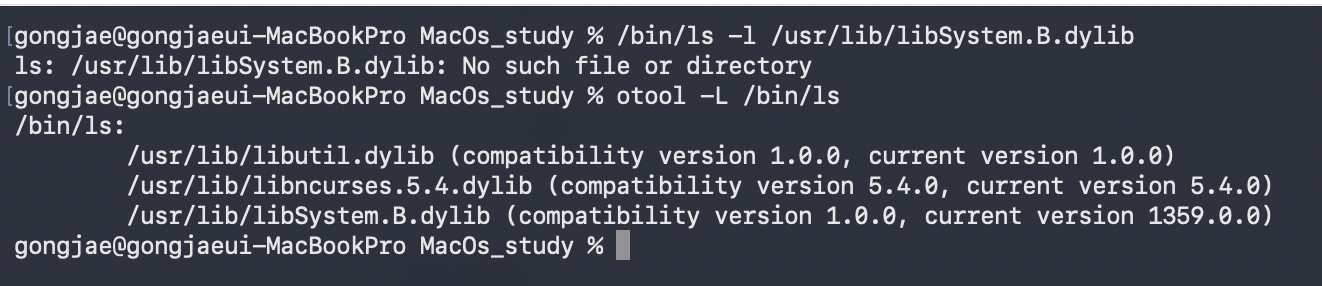
/bin/ls is sitting there declaring it uses the very file that just came back as missing, and ls runs perfectly fine. 😇
The reason is the dyld shared cache. macOS rolls every system library into one blob, finishes the linking ahead of time, and then clears the original files off disk. So the paths in otool -L aren’t where the file lives — they’re more like name tags to look up inside the cache.
So where is the cache itself? Right here.
$ /bin/ls /System/Volumes/Preboot/Cryptexes/OS/System/Library/dyld/ | wc -l
      82
$ du -sh /System/Volumes/Preboot/Cryptexes/OS/System/Library/dyld/
2.4G

$ DSC=/System/Volumes/Preboot/Cryptexes/OS/System/Library/dyld/dyld_shared_cache_arm64e
$ ipsw dyld info $DSC
...
Num Images     = 4088
Num SubCaches  = 79
Shared Region:  6GB, address: 0x180000000 -> 0x339B10000
82 files, 2.4GB. Note that if you give ipsw dyld info only a filename it looks in the current directory, so you may get does not exist. It’s easier to pass the full path or stuff it in a variable like above. (Variable-setting muscle memory, forged by Windows PowerShell!)
4088 libraries, all sitting in a 6GB address space. In Windows terms it’s as if the entire System32 folder were a single file. To pull one out, just use ipsw.
$ ipsw dyld extract $DSC \
    /System/Library/Frameworks/Foundation.framework/Versions/C/Foundation \
    --output ./out
   • Created out/Foundation

$ /bin/ls -lh out/
-rwxr-xr-x  31M  Foundation
A 31MB Foundation pops out in 0.6 seconds. Now we can throw this into IDA, right? Of course, only shared libraries live in the cache. Daemons and executables like /usr/libexec/trustd are still right there on disk. Most of what I analyze from here on is that side. Then why’d you even tell me about the cache?
2) No Function Names Either?
We pulled the file out, so now we just open it and analyze, right! Nope.. here’s where you get stuck again.
$ ipsw macho info --arch arm64e --starts /usr/libexec/trustd | /usr/bin/grep -c '^0x'
1270
$ nm -arch arm64e /usr/libexec/trustd | /usr/bin/grep -cE '^[0-9a-f]+ [tT] '
1
1,270 functions, and exactly 1 of them has a name. Exactly that feeling of opening a PDB-less binary on Windows and getting nothing but sub_1800????.. But here macOS throws people like me a bone: Objective-C method names survive stripping.
$ ipsw macho info --arch arm64e --objc -V /usr/libexec/trustd
// 0x100027108
- (_Bool)fetchNext:(id)next context:(id)context;
// 0x1000271bc
- (void)recordSSRFShadowBuckets:(unsigned int)buckets forContext:(id)context;
From the same binary, 236 methods come out with their names intact and their addresses attached. The reason is simple: ObjC doesn’t call functions by address — it looks them up at runtime by a string name like fetchNext:context:. Erase the names and the program stops working. So they don’t live in the symbol table that nm reads; they’re kept separately in regions called __objc_*.
Why is that good for us? It means we can see, as a plain list, what functionality a daemon exposes to the outside — before reversing anything. And 340 of 581 system daemons (59%) are ObjC, so it usually works.
3) The Debugger Won’t Attach Either?
Huh, can’t I just check it dynamically?? — Nope, you can’t.

Even /bin/ls won’t run under a debugger. The culprit is SIP (System Integrity Protection) — Apple-signed platform binaries are blocked from being debugged. Same story even as root. Sure, you can turn SIP off and it’ll attach. But then the system I’m looking at stops matching a real user’s system. It’d be a bit much to finally find a bug and then hear “doesn’t that only work with SIP disabled?” Feels unfair, somehow..
So on macOS, static analysis becomes the fundamental skill. You build every hypothesis out of what’s on disk, and then you confirm it with a process you wrote yourself. Thankfully there’s far more you can learn statically than you’d expect. The next two sections are about exactly that.
4) Everything Is Written Down In Files!
On Windows, to see “what can this process do” you had to crack open the token, dump the privilege list, check the Integrity Level… one way or another you had to grab a running process. On macOS you don’t need any of that. You just open the file!
$ codesign -d --entitlements - --xml /usr/libexec/lsd | plutil -p -
{
  "com.apple.private.amfi.can-check-trust-cache" => true
  "com.apple.private.coreservices.canmaplsdatabase" => true
  ...
}
These are called entitlements. They’re permission declarations baked into the code signature, so you don’t need to run anything or attach to anything — if you have the file, you can read them. lsd alone carries 18 com.apple.private.* entries. Half the fun is that you can roughly guess what they mean just from the names. A com.apple.private.* prefix means it’s Apple-internal and third parties can’t get it; a kTCCService* entry means it can reach the camera, mic, or your disk with no consent prompt; and com.apple.rootless.* means it can touch that SIP-protected area from earlier.
Since all you need is codesign, I went ahead and surveyed an entire machine. No root, no execution needed.
# Result of running codesign across every executable in /usr/libexec + /usr/sbin + /usr/bin
executables                        : 1550
has at least one entitlement       :  523   (34%)
 ├ com.apple.private.*             :  465
 ├ TCC-related                     :  140
 └ rootless(SIP)-related           :   93
140 binaries hold TCC privileges, and 93 can touch the SIP side. These are the target vectors we were after. But finding a target vector isn’t the end, obviously, right? Naturally, if a process is touching TCC or SIP, odds are good that I can’t reach it in the first place..
Where Windows has ALPC and named pipes, macOS has Mach ports and XPC layered on top. Each service has a name like com.apple.xxxd, and you connect by looking that name up. So “can I even connect to that service” becomes the other half of the attack surface. And amazingly, this is also sitting right there in files!

552 .sb files are just sitting on disk as plain text. The structure is (deny default) to shut everything down and then (allow ...) to open only what’s needed — and the one we care about is mach-lookup. It means “you’re allowed to look up and connect to the service with this name.” Who is allowed to talk to whom, spelled out in text. Let’s count it in application.sb, the profile App Store apps use.

176 services a sandboxed app is allowed to connect to. So what’s behind those 176? That’s in a single file too. Crack open /System/Library/xpc/launchd.plist and you’ll find 917 LaunchDaemons (830 of them root) registering 2,028 mach services. Getting this much information out of a couple of Unix commands — pretty convenient, honestly! haha
5) Multiply It All Together? → You Get a Target List!
Now let’s multiply what we pulled out in 4). I took the 176, matched them against launchd’s registration data to find the actual binaries, and then read those binaries’ entitlements too.
services a sandboxed app can reach             : 176
 └ registered in launchd as a real daemon      : 140
    └ of those, running as root                : 132
       └ distinct root binaries behind them    :  99
          ├ holding TCC-related entitlements   :  56
          └ holding rootless(SIP)-related      :  23
The drop from 176 to 140 is because the rest are services living inside LaunchAgents or frameworks, which I excluded from this calculation. So if anything, that number is an undercount.
- A single sandboxed app can talk to 99 binaries running as root; 56 of them hold TCC privileges that skip the consent prompt, and 23 hold privileges that can touch SIP-protected territory!
- And everything it took to get here was
codesign,grep, and a few lines of Python. No debugger, no root, no execution!
That’s everything I wanted to say in Part 0. Starting is half the battle, as they say! haha And once you’re holding these 99, the road forks in two: logic bugs and memory corruption.
2. Logical Bug in macOS
The classic shape of a logic bug on macOS is the confused deputy. Unprivileged me gets a privileged process to do the thing I can’t do myself. It’s exactly the structure I used for the sandbox escape in Wipeload. All 99 above are candidates, wouldn’t you say?
Here are the vulnerabilities Apple generally treats as logic bugs.
| Boundary | What crossing it gets you | Which target vector |
|---|---|---|
| TCC | Screen recording, mic, ~/Library/Messages with no consent prompt |
TCC-related, 140 |
| App Sandbox | My code runs outside the jail. Usually the second slot in a chain | mach-lookup, 176 |
| root | System-wide writes, replacing daemons, persistence | root binaries, 99 |
| SIP | Modifying platform files, loading kexts, other apps’ data | rootless-related, 93 |
| Gatekeeper | Unsigned code runs with no warning | Anything that creates files without attaching quarantine |
It matters that SIP gets its own row. Getting root isn’t the end. Different from Windows in this respect too, isn’t it? That same SIP that blocked me earlier blocks even root. On macOS, root and a SIP bypass are separate slots.
So where do these actually blow up? Almost every public case I’ve read fell into one of these five.
| Pattern | What happens |
|---|---|
| ① Missing client validation | The XPC connection-accept handler unconditionally returns YES ⇒ anyone can call that interface |
| ② Identifying the peer by PID | PIDs get reused. Send the request, then swap your own process out for an allowed binary, and the server inspects the swapped-in one (this is why you use the audit token) |
| ③ Trusting a path | Uses the path I handed it verbatim ⇒ path traversal, or a link that pries apart check time and use time into a TOCTOU |
| ④ Not attaching quarantine | A privileged service unpacks or creates my file and forgets the quarantine attribute ⇒ Gatekeeper bypass |
| ⑤ Process injection | DYLD_INSERT_LIBRARIES, dylib hijacking, get-task-allow ⇒ my code runs with someone else’s privileges |
None of these really touch memory — what they share is taking perfectly normal code and, through a missing privilege check, getting it to do something else, wouldn’t you say?
3. Memory Corruption in macOS
On Windows, once you found a heap overflow or an OOBW, your next thought was a given. “Oh, this is gonna be exploitable.” On Apple Silicon that instinct just doesn’t hold… because the hardware is blocking you in two layers.
The first is PAC (Pointer Authentication). It stamps a cryptographic signature into the unused upper bits of a pointer and verifies it before use. Crack open a C++ virtual function call and it looks like this.
000000018079a528	ldr	x16, [x0]                   ; read the vtable pointer out of the object
000000018079a52c	mov	x17, x0                     ; modifier = the address that pointer sits at
000000018079a530	movk	x17, #0x634f, lsl #48       ;   + mix in the per-class constant
000000018079a534	autda	x16, x17                    ; authenticate the vtable pointer   <- gate 1
000000018079a538	ldr	x8, [x16, #0x10]!           ; pull the function pointer out of the slot
                                                    ;   (! = pre-index, so x16 becomes the slot address)
000000018079a53c	movk	x16, #0x4444, lsl #48       ; modifier = slot address + per-function constant
000000018079a540	blraa	x8, x16                     ; authenticate the function pointer and call   <- gate 2
#0x634f is the constant (discriminator) that differs per class. So even if you use a heap overflow to overwrite the neighboring object’s vtable pointer, the value you wrote has no signature on it, and you die right there at autda. That feeling of overwriting a vtable on Windows and happily running with it does not transfer here. (If you can forge the signature, well, that’s a massive vulnerability in its own right!)
The second is MTE (Memory Tagging Extension). Every allocation gets a tag, and on access the hardware compares tags — so if an OOB touches the neighboring allocation the tags don’t match and it blows up on the spot. That said, tags only go on up to small allocations; anything larger than that has no tag at all. This is what Apple calls MIE (Memory Integrity Enforcement). And if you actually check, you can confirm it’s all enabled.
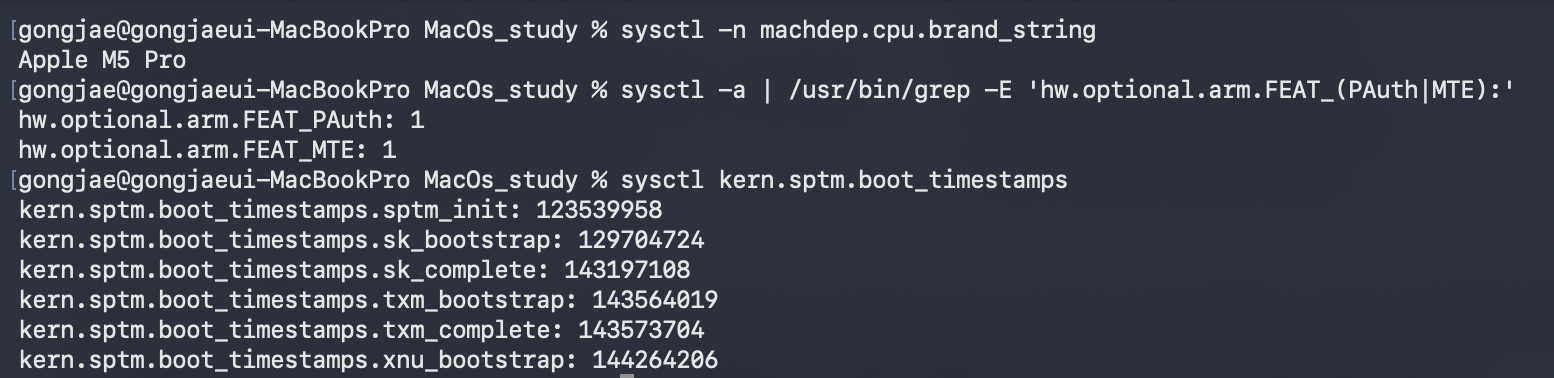
The boot order I pulled alongside it is interesting too. SPTM → SK → TXM → XNU — the kernel we all know comes up fourth. SPTM monopolizes page table changes and TXM holds the code-signing verdict, which means that even if you get code execution in the kernel, there are three more layers above you. Pretty different from Windows, where the kernel was effectively the finish line, no? Mwahaha..
So on macOS, the question you ask isn’t after finding a bug but before it: “what does this value I overwrote actually end up being used as?”
| If that value ends up… | Verdict |
|---|---|
| called as a function pointer (vtable etc.) | ❌ Dies at PAC. Don’t spend time on it |
| read as data only (integers, lengths, indices) | ✅ Still alive |
| resolving to a buffer pointer, a write, or liveness | ✅ Still alive |
And in fact, the first public kernel exploit on an MIE-enabled M5 Mac, in May 2026, was a data-only approach that never touched a code pointer. So here, finding a heap overflow isn’t the end — what it overwrites is what sets its worth. So where do you look? Pick the things that parse bytes out of the list from Chapter 1. Image, font, and video parsers, plus the daemons that sit there with a socket open — that’s where they are.
4. Apple Security Bounty — ASB
There’s one surefire way to prioritize all the boundaries we’ve covered: Apple put price tags on them and published it!! Pie in the sky, sure.. but just looking at the category table tells you a lot about which vulnerabilities Apple actually wants, wouldn’t you say?
https://security.apple.com/bounty/categories/
5. Wrapping Up
The approaches I used on Windows — looking at IPC connections, looking at privilege boundaries, looking at parsers — actually have a pretty similar grain on macOS. It’s just the methodology that differs a bit.
The plan from here is to start with logic bugs, move on to memory corruption, and eventually study the kernel too, scraping away at the dirt under macOS’s toenails!! Mwahaha~
Thanks for reading this far, and see you in the next one! 🐺

본 글은 CC BY-SA 4.0 라이선스로 배포됩니다. 공유 또는 변경 시 반드시 출처를 남겨주시기 바랍니다.